Hello everyone! I am delighted to be here and to have your help and support. I started this thread because I think I’ve bitten off more than I can chew by deciding to set up a distribution to create an EMR solution for my private practice. I am a clinical psychologist and clinical neuropsychologist running a small independent practice where I work alongside a psychologist and a physician (we provide outpatient mental health and neurocognitive care). The issue is that this year in Chile—a country in the southern part of South America—legal regulations regarding personal data protection, as well as specific rules concerning clinical records and their interoperability, have become particularly stringent; consequently, independent healthcare professionals like us are left with few options. In this climate, most of us are being (subtly) forced to sign up for EMR platforms that are not only expensive in Chile but also very poor in quality and limited in functionality—making them particularly unsuitable for professionals who operate with an ethos of continuity with the public health system by maintaining low, accessible pricing standards. So, I decided to give OpenMRS O3 a try. While I have managed to get it up and running on a VPS (it is running on Ubuntu 24.04 using Docker) and have successfully configured a few things…
Set up locations
populate the appointments module with data on professionals’ specialties and care types;
populate the Address Hierarchy module with data specific to Chile, in compliance with current health regulations, and adjust the address layout accordingly;
create user profiles for professionals, assigning them the appropriate provider roles;
create the patient identifier type used in Chile (RUN/RUT) with its specific requirements;
create the person attributes needed to accurately record patient information—such as health insurance providers available in Chile and patient gender identity;
create visit types, encounter types, and appropriate forms for each encounter type, among other items),
I haven’t yet managed to get the `esm-patient-registration` module to include the fields I need to integrate (insurance/health plan, gender identity, preferred name). Nor have I managed to configure the consultation start process (from the appointments screen) so that healthcare professionals can launch specific encounter types directly; currently, the system only allows me to start a general consultation and then select a form.
You should know that I am not a programmer and have no coding experience; everything I’ve done so far has been with the help of AI. I am currently working on OpenMRS O3. I removed the demo data from my installation—leaving the system nearly empty—and am now experiencing frequent crashes (apparently because frontend modules still reference data that is no longer available). I haven’t tried configuring a `config.json` file yet because I’m still gathering the necessary modifications for the operational modules. However, I already know there are modules I don’t need but don’t know how to disable (e.g., laboratory, bed management, payment systems, emergency care queuing). There are also many dashboard components I don’t require (immunizations, payment history, vital signs/biometrics, medications, orders, procedures, programs). This is because the role OpenMRS will play in my clinical ecosystem is simply that of a clinical record repository: it needs to show each professional their patients for the day (which is why I believe the appointments module is useful and necessary) and allow for the proper recording of care provided. I really need help!!!
First of all, welcome to the OpenMRS community! @humberto.fuentesn You’ve made great progress already. From what you’ve described, most of the remaining work is frontend configuration rather than backend setup for sure. I am thinking of 3 fixes possible
Stabilize the system and simplify the UI:
Now instead of deleting metadata or modules, you can create a config.json file to disable the apps and dashboard widgets you don’t need (Lab, Bed Management, Medications, Vitals, Programs, etc.). This prevents the frontend from referencing unnecessary resources, resulting in a cleaner interface and avoiding many of the crashes you’re seeing.
Customize patient registration: You were like you required Person Attributes now since you’ve already created the required Person Attributes (insurance, gender identity, preferred name), you can expose them in the O3 registration form by referencing their UUIDs in the registration configuration within config.json.
Appointments workflow: The current O3 Appointments app doesn’t natively support launching a specific encounter type directly from an appointment. This requires a small frontend customization, but it’s definitely achievable.
Hi! Thanks so much for getting back to me! I wrote here full of hope, since I’ve been trying to get this up and running for about a month now and realize I actually know very little about it.
I’m not sure how to show you what you’re asking for. Since I’m not very skilled with code, I installed FileZilla on my PC to interact with the server via a graphical interface and get a clear idea of where each file is located (as I suspect things might be a bit disorganized). Should I upload something to GitHub, or should I send you a screenshot right here?
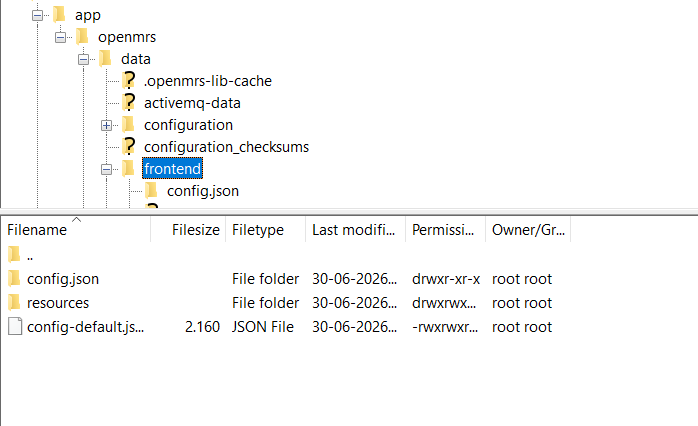
Hi! Thanks so much for writing to me! I think I’ve managed to do quite a bit, considering my limited programming skills (which are practically non-existent, really XD), but I’m currently stuck on adapting the front end to my needs. I just realized today that, since I’m not very comfortable with command-line interfaces, I could use something more user-friendly; so, I installed FileZilla on my PC. Now I have a clearer view of the directory structure—I can see the contents of each folder in real-time and edit them. This helped me locate the directories housing the frontend configuration file, `config.json` (`/app/openmrs/data/frontend`), as well as the directories for uploading the CSV files containing the data required for the modules and INIZ (I assume) to function (`/app/openmrs/data/configuration`).
Ohh @humberto.fuentesn that’s definitely a good step by the way using FileZilla over SFTP can make it much easier to navigate and edit your O3 configuration . Just keep in mind that config.json may not exist by defaultyou may need to create it depending on your deployment. also, after making changes, you may need to restart the frontend container (or clear the frontend cache) for the updates to be reflected. Once you have config.json in place, you can begin disabling or removing the unnecessary apps and exposing your custom personal attributes in the UI of your registration workflow.
Yes, that’s right—the `config.json` file hasn’t been created yet, and I understand I should create it once I’m clear on all the modifications and specifications I need to implement… I’m wondering if I need to instruct the system to point to the `config.json` file somehow (for instance, with a line in `docker-compose.yml`), or if that file will be automatically read by the INIZ module?
You don’t need to modify docker-compose.yml for O3 to read config.json, as long as it’s placed in the correct frontend configuration directory (typically /app/openmrs/data/frontend/config.json). The frontend automatically looks for this file at startup. Also, config.json is not managed by the Initializer (Iniz) module. The Initializer module is responsible for importing backend metadata (concepts, encounter types, person attributes, forms, CSV files, etc.), while config.json is used by the O3 frontend to control the UI, extensions, dashboards, and application behavior. So, they serve different purposes but complement each other: use Initializer to configure the backend metadata, and config.json to configure how that metadata is presented and used in the frontend…have i answered your qtn?
Thanks, Tendo! I’ve checked that page, but I don’t think I have enough knowledge to fully make use of the information there. I’ve already created the `config.json` file and placed it in the `app/openmrs/frontend` directory, but the system seems to be ignoring it completely; for some reason, a folder named “Config.json” is appearing inside that directory.
 using FileZilla over SFTP can make it much easier to navigate and edit your O3 configuration . Just keep in mind that