Minimum does not necessarily mean the recommended. 
sure  let me update the messages
Hello,
Thank you for sharing the Reference Application Standalone 3.7.0-SNAPSHOT.
Unfortunately, I was unable to run it successfully on Windows. During startup, MariaDB starts correctly and the OpenMRS database is created, but Tomcat never becomes available on port 8082.
I also found that the package includes the module:
- chartsearchai-1.0.0-SNAPSHOT.omod
However, the required dependency appears to be missing:
- querystore
The logs contain the following error:
ClassNotFoundException: org.openmrs.module.querystore.api.QueryStoreService
which causes Spring initialization to fail and prevents OpenMRS from starting properly.
I confirmed that:
-
Java 17 is installed and working correctly.
-
MariaDB starts and listens on port 3317.
-
The OpenMRS database is created successfully.
-
The chartsearchai module is present, but no querystore module is included in the distribution.
Could you please confirm whether:
-
The querystore module is missing from the package?
-
There is a newer build available that fixes this dependency issue?
-
chartsearchai should be disabled manually before first startup?
Thank you for your help.
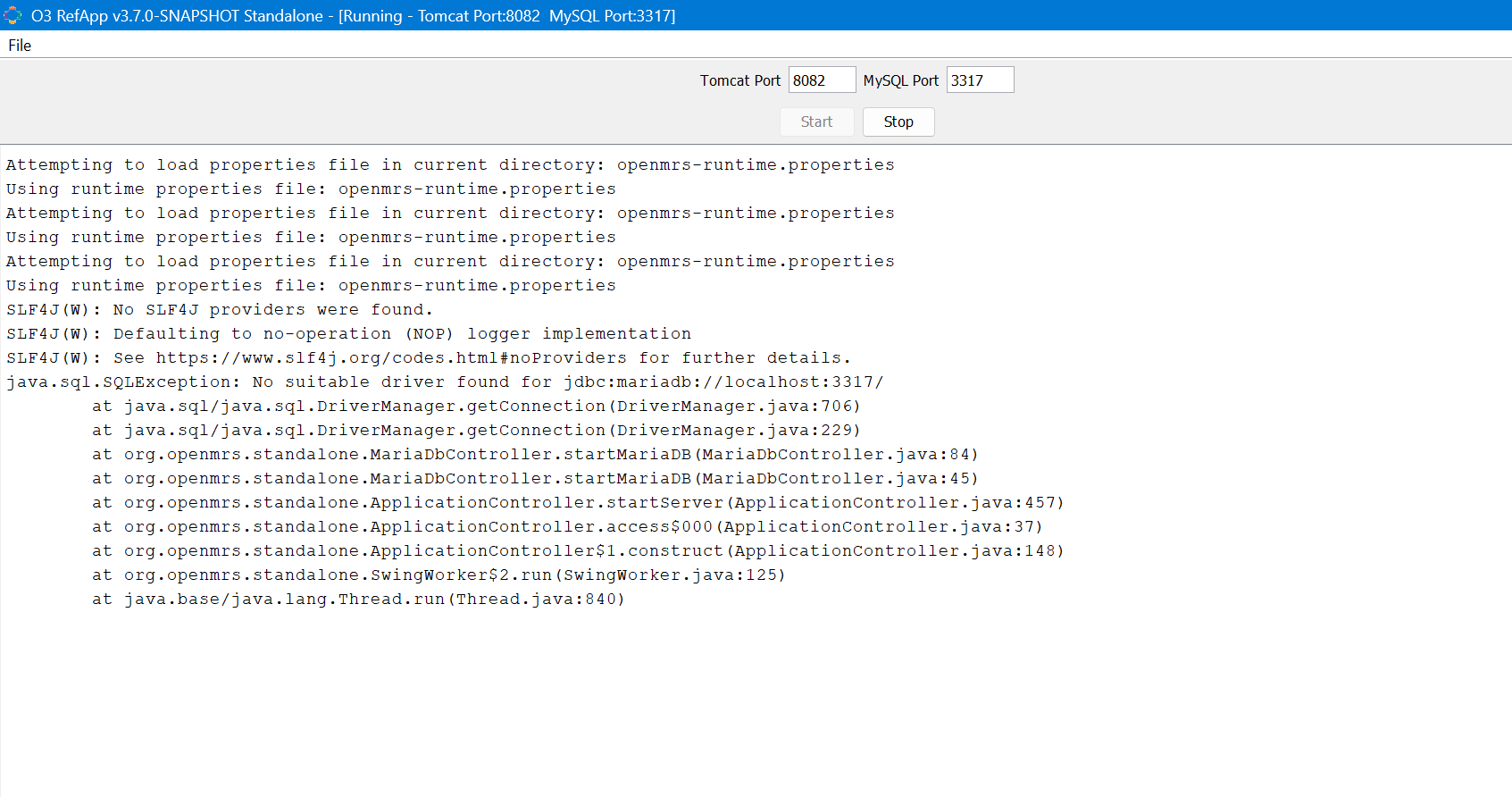
To answer your three questions directly, this is what I would say;
Yes, the querystore module does appear to be missing. The chartsearchai module declares a dependency on org.openmrs.module.querystore, but no corresponding querystore.omod is included in the distribution. This is almost certainly a packaging oversight in the 3.7.0-SNAPSHOT build.
There is no confirmed fixed build yet since this is a SNAPSHOT, it is still under active development. I’d recommend watching the release notes or asking the maintainer directly whether a newer snapshot addresses this.
Yes, as a workaround, you can manually remove chartsearchai-1.0.0-SNAPSHOT.omod from the modules folder before the first startup. Since it is the only module causing the Spring context failure, removing it should allow OpenMRS to start. You can re-add it later once the querystore dependency is available.
Additionally, regarding the separate error visible in your screenshot, java.sql.SQLException: No suitable driver found for jdbc:mariadb://localhost:3317/ which suggests the MariaDB JDBC driver JAR may also be missing or not on the classpath. Check your distribution’s lib folder for a file like mariadb-java-client.jar. If it is absent, downloading it from Maven Central (version 3.x) and placing it in lib/ should resolve that part of the startup failure.
Hope this helps get you unblocked as you wait for @jonathan with probably a better explanation.
@jhislainemat does this happen only on port 8082? another question is when you start the server does it by default tomcat use port 8080?
Have you tried updating the port in tomcat section? lastly Could you share the logs you are getting here pastebin.com
@jhislainemat can you try again to download the standalone from here: GitHub - openmrs/openmrs-standalone at openmrs-emr3 · GitHub
This is the exact download link: https://nightly.link/openmrs/openmrs-standalone/workflows/build-o3-standalone/openmrs-emr3/openmrs-standalone-o3.zip
Thank you for your help and the detailed explanation.
After further investigation, I confirmed that the issue is not related to Tomcat ports (8080/8082). The startup process fails before OpenMRS is fully initialized.
I also disabled the chartsearchai module, which removed the missing querystore dependency issue. However, the application still fails with:
java.sql.SQLException: No suitable driver found for jdbc:mariadb://localhost:3317/
MariaDB appears to start correctly and is listening on port 3317, but the JDBC driver is not being loaded properly by this standalone distribution.
Thanks again for your assistance and guidance.
@jhislainemat let me investigate it for a fix
@jhislainemat i have just fixed it. Can you download again and test?
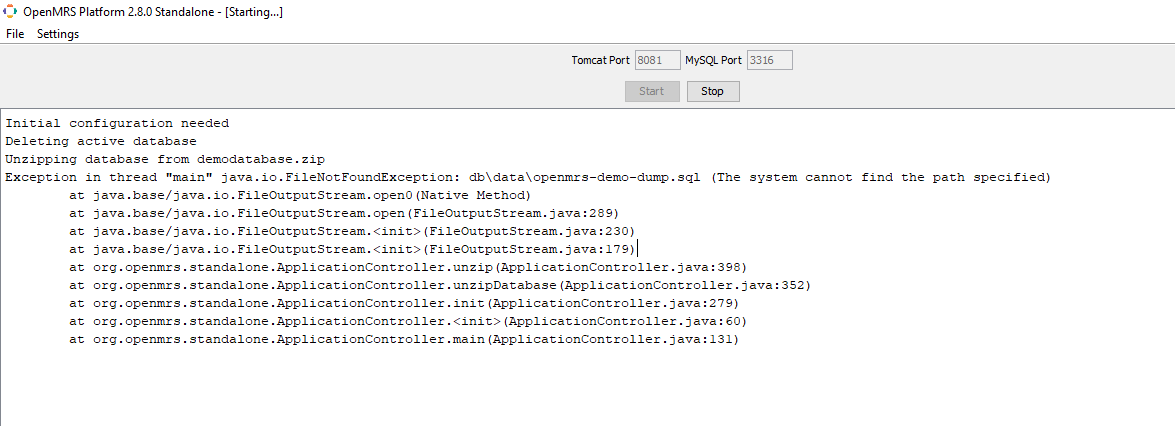
hey @dkayiwa , seems the other download never completed well, this one keeps failing again just when is about to complete.
@omeri do you have a problem with your internet connection?
not really, may be i try another ISP
It works well now, thanks @dkayiwa
Thanks, @dkayiwa ! Nightly build works perfectly fine, but my colleague ran into a problem where she couldn’t switch the interface to Russian or add diagnoses in that language. I added the language code to the “allowed” list for her, but it still didn’t appear in the list; unfortunately, the code ?lang=ru doesn’t work either
Is it even possible to use Russian in the standalone version? Judging by Transifex, O3 has been fully translated. Thanks!
Can you use ru_RU instead of ru? ?lang=ru_RU
This changes the language code in the top-right corner of the menu, and the legacy admin panel also switches to Russian, but it doesn’t appear in the list of languages, and the entire UI v3 remains in English. Maybe the language settings or the list of languages for the new UI v3 are hidden somewhere else?
I even replaced “en” with “ru” in appdata>configuration>globalproperties>referenceapplication-demo before launching openmrs-standalone.jar
Looks like a bug which was just fixed here: (fix) O3-5874: Handle regional locales in the change language modal by denniskigen · Pull Request #1832 · openmrs/openmrs-esm-core · GitHub