Of recent I made changes to address the java.lang.OutOfMemoryError: PermGen space (Maven/Jetty) which was achieved. However, now when the server is invoked, it takes longer to start [It takes 45 minutes to be up]. Here are the changes I made in both the /etc/init.d/tomcat8 and /etc/default/tomcat8 files.
I set JAVA_OPTIONS to JAVA_OPTS="-Djava.awt.headless=true -Xmx512m -Xms1024m -XX:PermSize=256m -XX:MaxPermSize=256m -XX:NewSize=128m -XX:+UseConcMarkSweepGC"
and also set CATALINA_OPTIONS to
CATALINA_OPTS="-Djava.library.path=/opt/tomcat/lib/.libs -Xmx512m -Xms1024m -XX:PermSize=256m -XX:MaxPermSize=256m -XX:NewSize=128m"
please share your pc specs and the logs so we can figure-out which process/line takes up all that crazy time?
BTW, did you see 'Please set the MAVEN_OPTS system property to " -Xmx768m -XX:MaxPermSize=512m " ’ at OpenMRS SDK - Documentation - OpenMRS Wiki ?
The flag Xmx specifies the maximum memory allocation pool for a Java Virtual Machine (JVM), while Xms specifies the initial memory allocation pool. … The Xms flag has no default value, and Xmx typically has a default value of 256 MB.
1 Like
Not really! Does this mean setting this property in both /etc/init.d/tomcat8 and /etc/default/tomcat8 files OR in either of them
you can use export command or checkout How to permanently set environmental variables - Unix & Linux Stack Exchange
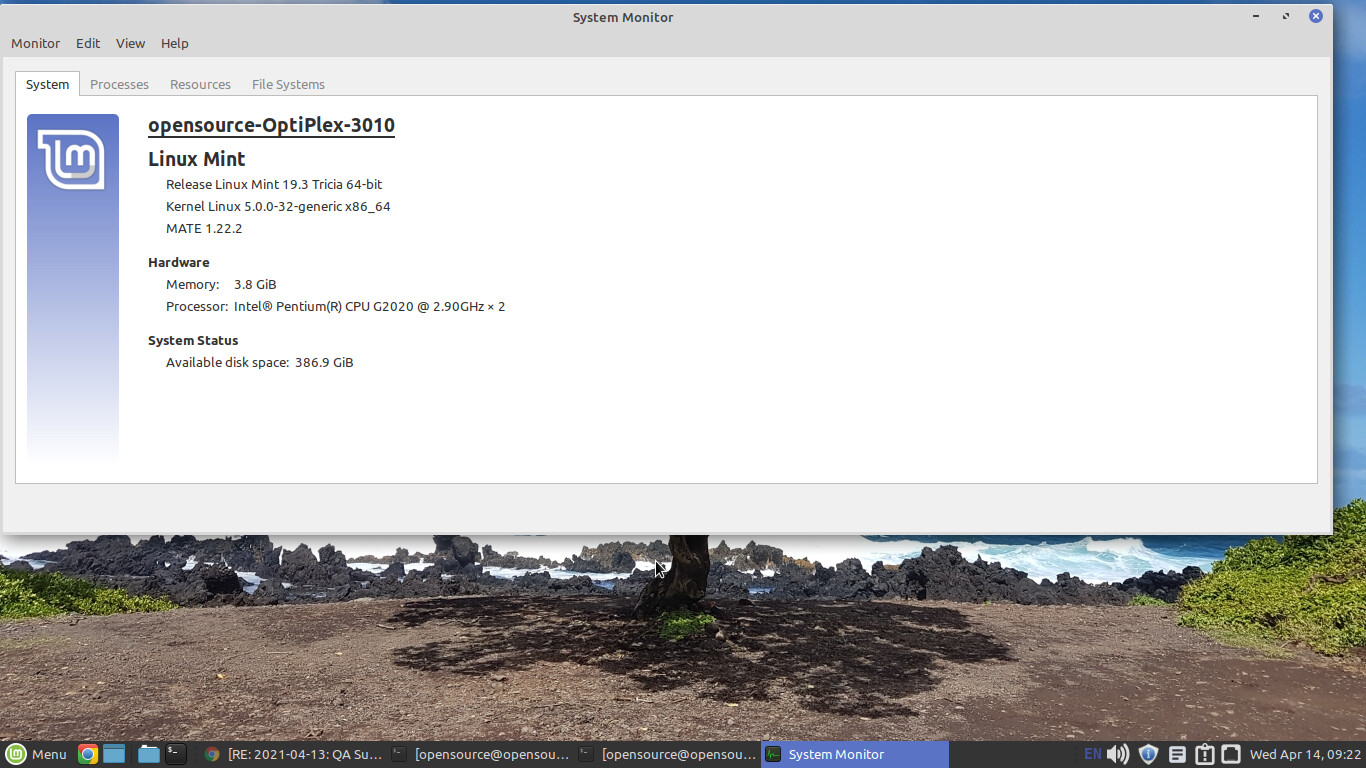
64-bit os, x64-based processor, 4GB RAM
describe the processor also and OS. software recommendation - How do I check system specifications? - Ask Ubuntu
Thanks for the resource @k.joseph . Here is the PC specs
1 Like
looks good enough,
use MAVEN_OPTS and both Xmx and Xms properties
Have set the MAVEN_OPTS as recommended. I can see this affirmed when starting the server Using JAVA_HOME: /usr/lib/jvm/java-8-openjdk-amd64/jre
Using MAVEN_OPTS:   -Xmx768m -XX:MaxPermSize=512m
Starting ‘openmrs-sdk-mysql-v3-2’ DB docker container…
Trying to connect to the DB…
Connected to the DB.
Starting Tomcat…
Apr 14, 2021 11:04:25 AM org.apache.coyote.AbstractProtocol init
INFO: Initializing ProtocolHandler [“http-bio-8080”]
However, the process consumes more time(30 minutes) at:
INFO - EhCacheManagerFactoryBean.afterPropertiesSet(129) |2021-04-14 11:05:57,957| Initializing EhCache CacheManager
you could be having a module inside that’s causing that. which ref app version are you running?
There is no module inside the one I created with mvn openmrs-create-project
The version is: Reference Application 2.11.0
there are definitely modules in your home folder in the openmrs server folder.
BTW, you need to try Xms
1 Like
@kdaud hope the process does not hang up at any time!
It happens during the start up process
you can share the entire log, before the hang, there’s a module trying to start and is normally the culprit
Logged at createdproject - Pastebin.com
Doesn’t the SDK use an embedded tomcat instead of the one you have configured?
Boolean = true
Finally  Finally
  Finally
  !
!
Just as @k.joseph said I had a module that got messed up inside the server that made me dance for over and over until I removed it and things are working pretty well with < 4 minutes start up time and very light. Regards @k.joseph @herbert24 @dkayiwa
1 Like
which module was that and had you any changes that messed it up?