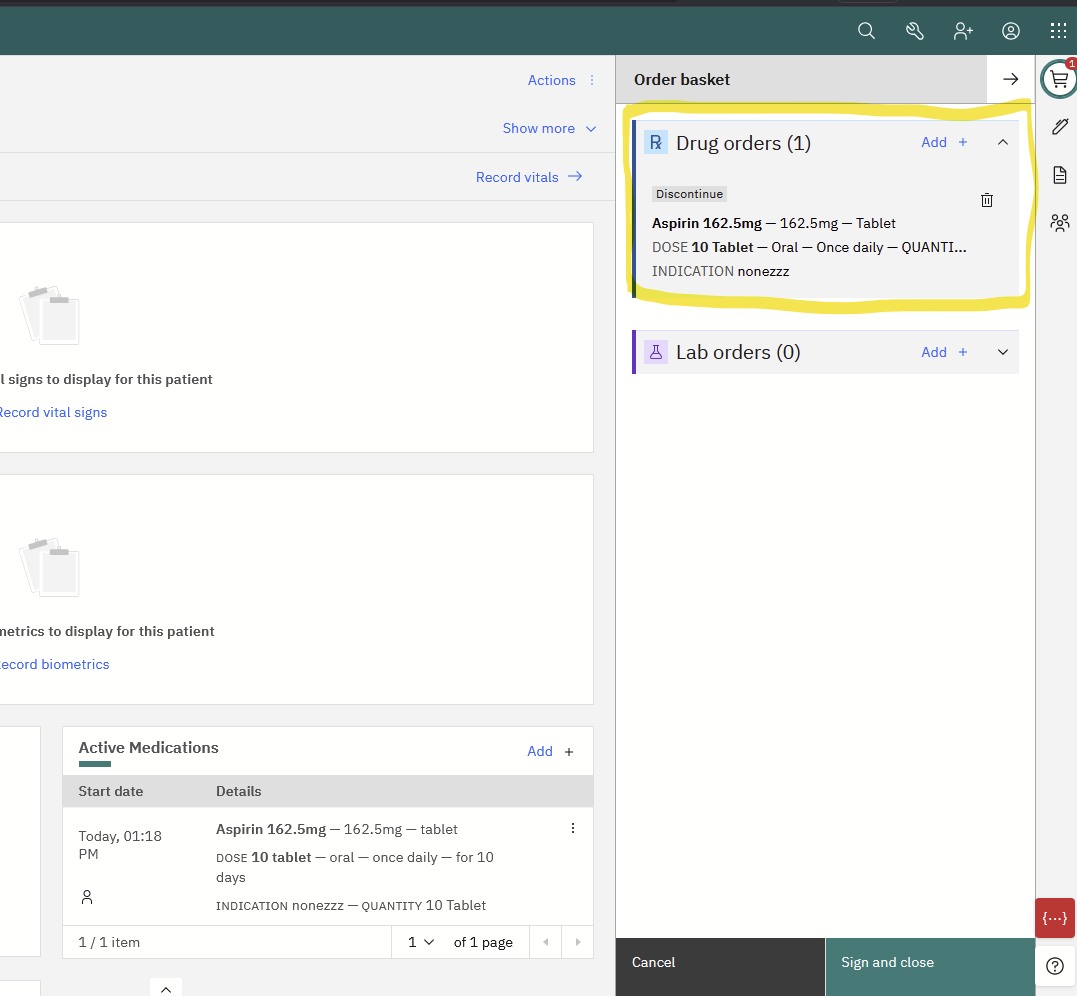
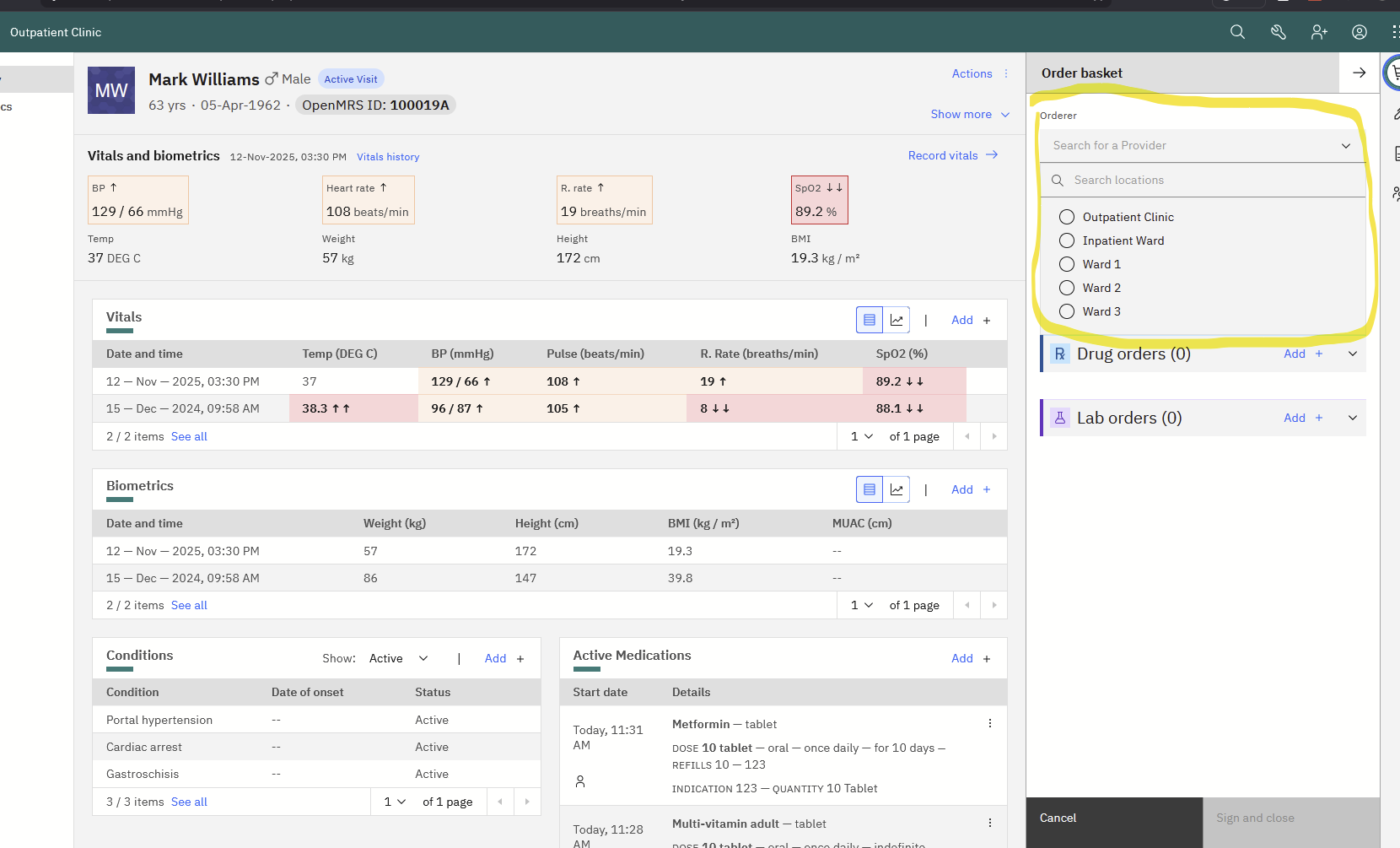
I’m thinking of changing how the O3 order basket works when we modify an existing order.
The order basket consists of several workspaces (the main order-basket workspace, the drug order workspace, the lab order workspace). When placing an order, we first open the main order-basket workspace, click the “Add +” button on drug order / lab order, and then we can fill out the corresponding drug / lab order workspace form. After we click the “Save Order” button in that workspace, we are taken back to the main order-basket workspace, where we can place additional orders or click the button to submit all the orders in the basket. This is an ok workflow when creating orders.
When we want to modify an existing order (by going to the orders tab in the patient chart and clicking on “modify order” for an order in the orders table), it first opens up the drug order / lab order workspace directly (bypassing the main order-basket workspace, which is fine). However, after clicking “Save Order”, we are also taken back to the main order-basket workspace, which also allows for adding additional orders or submit all the orders in the basket.
I’m thinking of changing it so that, when modifying an existing order, and we click “Save Order” (or maybe a slightly renamed button), it directly submits the modified order and closes the drug / lab workspace (instead of going back to the main order-basket workspace). The reasoning is that we are adding support for child workspaces. When creating an order, there is a clear parent-child hierarchy (ex: main order-basket => drug / lab order), and when closing the child workspace, we just go back to the parent (main order-basket). However, in the modify case, the main order-basket is not the parent workspace, and we only open the drug / lab order workspace.
Let me know if you have concerns about this. Thanks!
Thanks @chibongho I think that especially for editing or modifying orders from the tables showing them, this seems like a sensible idea. Since it’s a pretty big change in workflow and we have the current workflow deployed in a few thousand sites, it would be good to get broader feedback from the community on this.
@grace Might you be able to tag appropriate community leads here or otherwise sound them out on this?
Update on this: we have implemented the change described above. That is, when we modify a drug order and hit “Save”, the frontend directly sends the save request to the server and closes the workspace. (Previously, it only saved the modified order to the frontend order basket to batch with any other orders before the user hits “Sign and close” and send the batch of orders to the server.)
I want to do something similar with the “Discontinue” action on drug orders. Currently, hitting “Discontinue” on an active drug order also places it to the order basket. I want to change it so that clicking on “Discontinue” will show just show a modal to confirm the action, and clicking confirm will send the discontinue request to the server. This will further decouple the order basket from actions that modify existing drug orders: only new or re-new (reordering) drug orders will be batched into the order basket.
New: (No mockup yet; but basically just a modal to confirm Discontinuing the drug.)
Motivation: We want to implement a way in the dispensing app for pharmacists to fill paper prescription forms they receive from their patients into the system. Sometimes the prescription is for multiple drugs, so the order basket seems great for this use case. However, we need to add support to fill in the ordering clinician and the ordering location before submitting the orders. Currently, we assume those to be the EMR user and the user’s login location, respectively, but that is no longer true in this new use case. We can just add those fields to the order basket workspace, but that only makes sense if all of the order basket items are new.
Sorry, I want to propose more changes. Rather than making yet another post, I’ll just keep the discussion here. Previously discussed changes:
Have only “NEW” or “RENEW” orders in order basket. Actions to modify or discontinue an order are saved directly to the server, instead of being staged in the order basket. (Discussion in the above thread.)
Combine the Drug Search field with the rest of the Drug order form. Post
I want to bring attention to a couple tickets I filed for the order basket that will have additional changes to its behavior.
O3-5290 Orders placed in Order Basket at separate times should occur in separate encounters
Currently, when placing orders at different points in time throughout a visit, the orders are batched into the same encounter. This might be ok for a OpenMRS system that does not support visits, but we think it should not do that for systems that does. We propose changing the order basket behavior such that orders placed at separate times are in separate encounters.
O3-5292 Order Basket should support ordering on another clinician’s behalf
We would like to add additional fields in the order basket to ask for the ordering provider and ordering location (and, eventually, ordering time). This is useful for scenarios where the clinician placing the order is different from the person putting it into the system, such as Retrospective data entry, or when a pharmacist is handed a paper prescription by a clinician.
For now, we are thinking of showing these fields only when we configured (in frontend) the provided roles that can place orders. If that is not configured, the ordering provider dropdown does not work, and is not shown.
Eventually, in addition to the config, we want to have additional condition to show the field only when the user can change them. We still need to decide on the right behavior, but this can either be done either through:
user permission. Only show those fields if the user has the right permission to order on another clinician’s behalf
encounter type. Only show those fields if the encounter type is a scenario where the user is placing an order on another clinician’s behalf
Hmmm… The idea of the order basket here is that during the course of care, a clinician might queue up several actions and then once the appointment is over, they can review those actions, modify them and then submit them. This is why discontinues are done through the order basket. It gives us a way to do a double-check without needing a flow-breaking confirmation modal. I’m fine with having an alternative pathway, but I don’t love doing something that potentially disrupts clinical flow in the chart (the chart is mainly designed as a view a clinician uses; other users and workflows may need different setups).
Again, the goal here for point of care data entry is that the orders all get entered at once for a single visit. I’m not sure I like the idea of splitting these into encounters without some kind of organizing grouping for how where doing that.
I played with the Orders REST endpoints more and noticed that order objects are actually immutable. That is, when you attempt to modify an order, it stops the existing order (essentially voiding it) and creates a new order object that references the existing one as its previousOrder. In that sense, I think having Discontinue actions batched into the order basket is fine, even in the case where the user is entering an order on another clinician’s behalf (like in RDE.)
Batching orders all at once into a single encounter might make sense for outpatient visit, but I think we need a different behavior for inpatient, when it’s not unusual for the visit to span multiple days, with orders placed on different days. In this old thread, we talked about using the EMRAPI’s endpoint to handle the logic of grouping encounters, and I think we’ll need that in the long term.
They’re relatively immutable, i.e., the fulfiller properties are changeable, but yes, most operations will create a new order. Obs are similar.
Ideally, though, an inpatient visit has multiple encounters. I’m not arguing to try to keep the order basket submitting to the single Order encounter the way it does. That behaviour is wrong and orders should be attached to the relevant clinical encounter. Basically, I agree with moving all of this to EMRAPI’s backend, but that doesn’t really change the UX point that we want a clinician to be able to queue up multiple orders or an order set and submit them as a unit.
Yes, I’m mainly proposing that we change that wrong behavior. I’m not opposed to changing how the order basket can batch multiple orders. I still think every submission of the order basket (with 1 or more orders in it), at different points in time, should create a new encounter, but ideally the EMRAPI endpoint is flexible enough to do something different if needed (say, if the same clinician submit another order within 5 minutes of another one they submitted).
I added my notes to the ticket, but, in the short-term I think the we should just create one encounter per submission of the order basket. Mid-to-long term we should implement functionality in the back end to properly associate orders with the appropriate clinical encounter. Basically, I think 1) the current logic is very wrong (specifically for inpatients sounds like you have an inpatient stay for days and subsequent orders placed over the course of the stay all end up on an encounter on day one?) and we so should remove any logic matching orders to existing encounters ASAP and just create an encounter-per-order-basket-submission, and 2) in the near future we should implement better behavior, but this should live on the back end.
I was little confused about not being able to “batch” discontinue orders in an order basket, but it seems like you’ve moved away from needing to do this @chibongho ?
Correct. I was concerned that, especially if we place new fields in the order basket to select orderer and ordering location, then when we discontinue an order, its orderer could get changed. With the way we modify / discontinue orders (by stopping (voiding) the current one and creating a new one, so both the original orderer and the discontinue orderer are recorded), that shouldn’t be a problem.