OpenMRS Omnibar Prototype

Hi community!

I’ve been a part of numerous conversations with community members about O3, and what it might look like in the future, given the rapid advances of agentic technologies.

Today, the O3 user experience is mouse- and application-oriented. You find a patient, then click through the app to get what you want. That’s hardly unique to OpenMRS: most EMRs have spent decades building sophisticated interfaces that try to anticipate how users will want to reach their data, and every new need becomes another screen, tab or menu.

In the age of AI, I think it’s worth stepping back and reconsidering what an EMR is and how it should work. My gut tells me that we should build the next generation of OpenMRS UX around a simple presumption:

A user can simply ask the EMR for what they want, rather than navigate an interface to find it.

There are very few places in O3 today to ask an open-ended question. The most natural pattern for that kind of interaction is a prompt box: ie, a browser address bar, or a LLM chat prompt. OpenMRS actually has one, but it’s hidden behind a magnifier icon and is only used today to look up patients.

I propose we unbridle that prompt! Let’s borrow the omnibar that browsers adopted years ago, let users simply ask for what they’re after, and use contextual clues to interpret those requests intelligently. The most important clue is where the user is. Inside a patient’s record, the most likely questions are about that patient: “cd4” means their latest CD4 count, and “when did she start ART?” means her history. Outside a patient record, the same box is more likely being used to find a patient (“Mary Achieng”) or to ask a question about a population (“women aged 15-49 enrolled in HIV”).

Asking doesn’t necessarily mean that everything has to go through a language model. Many requests can be answered directly and deterministically, for example from the concept dictionary’s names and synonyms, and anything generated has to show the records it came from. The omnibar is deliberately not a chatbot, and nothing typed into it changes the record. There’s lots of experimentation that we’ll have to do, to get this right!

So I developed a prototype of an O3 omnibar. :slight_smile:

I’ve posted the code to a new OpenMRS repo: GitHub - openmrs/openmrs-esm-omnibar-app: O3 Omnibar: pervasive EMR search foundation for OpenMRS 3 (prototype) · GitHub

@dkayiwa was also nice enough to install it over at http://chartsearchai.openmrs.org

Please take a look and share your thoughts! I’m traveling over the next 1.5 weeks, so apologies in advance if you don’t hear from me quickly!

11 Likes

Additionally, I did some prototypes of a few ESM apps, and how they might integrate with Omnibar:

ChartSearch AI: Jira

Cohort Builder: Jira

Query Store: Jira

4 Likes

This is really cool and I love the direction! I use github’s scoped search bar all the time to find stuff so I can already imagine how much easier this would make finding things on O3!!

(Looking at the little gif in the repo, I love how keyboard friendly you’ve made it!)

Feels like a mix of scoped search and Google’s dynamic results, which is pretty neat haha.

Btw, looks like https://chartsearchai.openmrs.org/ isn’t working right now. @dkayiwa, is this already on your radar?

1 Like

Oh yes it is on my radar and seems to be a problem with Jetstream. Thanks @jayasanka :smiley:

2 Likes

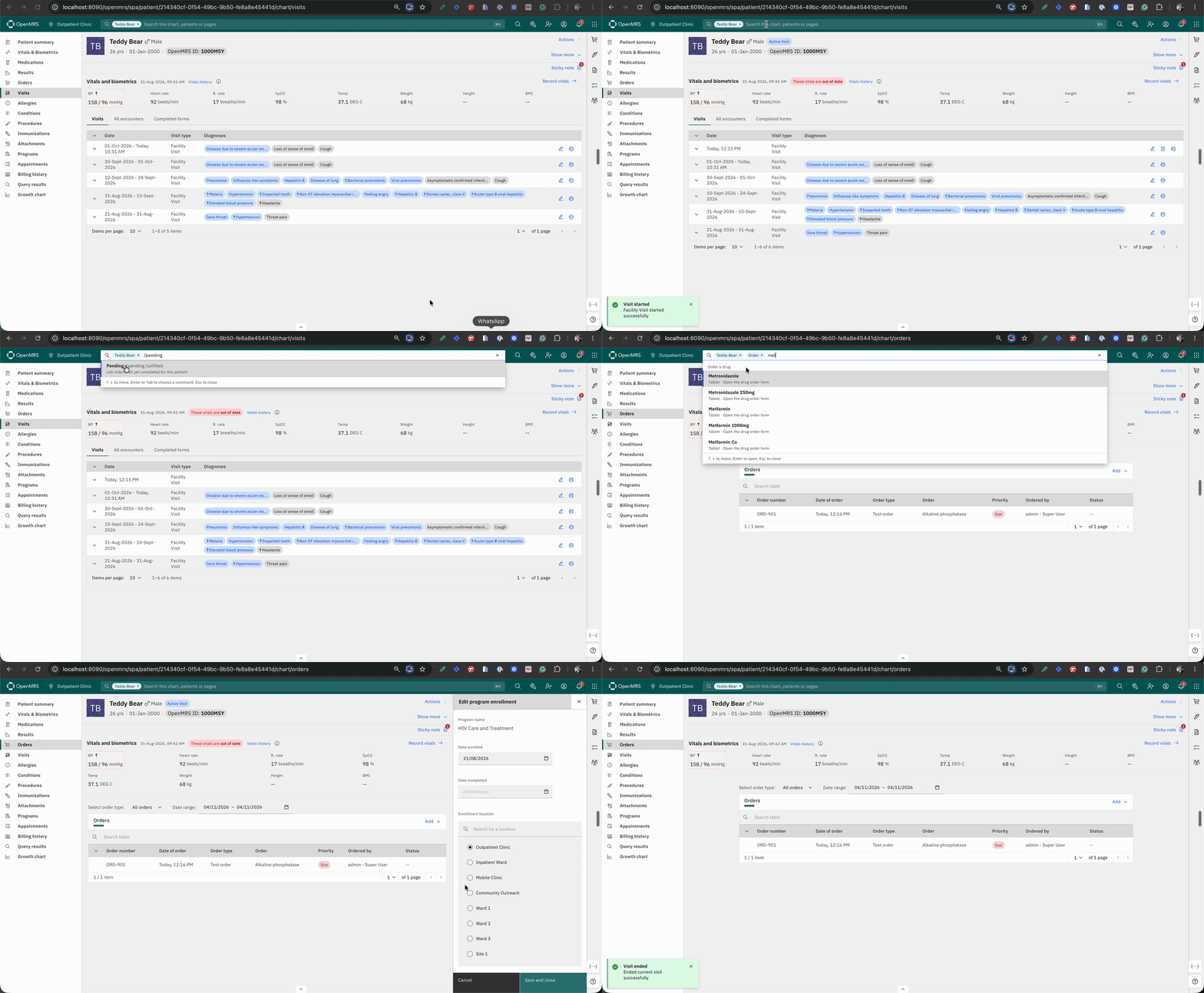
Thanks, @paul this is phenomenal. While prototyping the /order integration we discussed, a few more commands came up that fit the provider model, so I took it further. They’re running locally; here’s a 2-minute walkthrough:

omnibar_use_cases

  • /order metformin (or /order alp): lists matching drugs and lab tests. Choosing one opens the drug or lab order form with it already selected, and saving puts it in the basket as usual. Today that’s order basket → Add → search → select → form, so this collapses the search and select steps.

    • I imagine that once drug order templates land, dose, frequency, route, and duration could come pre-filled too.

    • If there’s no active visit, the drug and lab order forms show the same visit prompt the chart’s order buttons do, then reopen with the item still selected.

  • /visit: with no active visit, opens the same start-visit form as the banner’s Add visit and End active visit, which opens the existing confirmation dialog, so ending still takes an explicit confirmation.

    • Many chart actions need an active visit, so this unblocks them.
  • /pending labs: lists this patient’s lab orders that the lab hasn’t completed. Choosing one opens the Orders page.

    • The page’s date filter starts at today, so older orders need the range widened.
  • /enroll HIV: lists matching programs and opens the enrollment form with the program already selected, or the existing enrollment if the patient is already in it. The form still owns the enrollment checks.

Let me know what you think about these commands. My thinking is that they’re tasks clinicians repeat constantly, but they sit several clicks deep, so they test the “ask instead of navigate” premise directly. I’ll keep testing locally and open PRs (with Jira tickets) once they’re solid.

4 Likes

Kick ass @veronica!

This is precisely the kind of stuff I was hoping would happen.

I think the real question comes down to: what functions are surfaced inside the various O3 apps, and how can they register inside Omnibar. :smiley:

I think ultimately we’ll come up with some conventions, but these seem like a great start. Looking forward to installing your work locally so I can play and get more focused in on what you’ve done.

2 Likes

Thanks, @paul! Glad it’s useful. Everything is on one branch, so you can try it:

It adds four commands, each registered from its own app’s routes.json with its own copy of the contract folder, as your README describes:

  • /visit: start a visit, or end the active one
  • /order: drugs and lab tests
  • /pending: lab orders the lab hasn’t completed
  • /enroll: programs

It also makes the drug and lab order forms ask for a visit when they’re opened without one (same way that works currently).

To run it with the omnibar, from a patient-chart checkout:

git fetch https://github.com/VeronicaMuthee/openmrs-esm-patient-chart.git feat/omnibar-chart-commands
git checkout -b omnibar-chart-commands FETCH_HEAD
yarn install
yarn openmrs develop --backend <your backend> \
  --sources packages/esm-patient-chart-app \
  --sources packages/esm-patient-medications-app \
  --sources packages/esm-patient-tests-app \
  --sources packages/esm-patient-orders-app \
  --sources packages/esm-patient-programs-app \
  --sources <path to your openmrs-esm-omnibar-app>

Then open a patient’s chart and try /visit, /order amox, /order cbc, /pending or /enroll hiv.

Two things I’d value your view on:

  1. A modal result type. “End active visit” opens the chart’s existing confirmation dialog, not a page or workspace, so I added a small { type: 'modal', modalName, modalProps } target to the omnibar. It gets the same check as workspaces: inside a chart, it’s refused if the props name another patient. That change isn’t on the branch above. The omnibar hides results it doesn’t recognise, so without it /visit , it shows nothing while a visit is active. Would you be open to it? I can share it as a branch or PR on the omnibar repo.
  2. Conventions. On your point about which functions each app surfaces and how they register, I’d be glad to get your views on that.

Thanks, I’ll be on the lookout for your feedback.

Love this. One of the important lessons we have learned is the need to see information in context and to know what clinicians want to do with the information once they see it. Templating those as RAGs or perhaps skills would allow us to take advantage of LLM Ux without loss of those key perspectives. It has been one of my concerns that allowing the LLM to decide what is the only right information to return would lead to serious mistakes… I wasn’t able to see the demo’s enough before making this potentially ill-informed comment, but like where it is going.

@veronica, this is really nice work! :smiley:

I’ve deployed your changes on https://chartsearchai.openmrs.org so people can try it without setting anything up. Open any patient’s chart and type /order amox, /order cbc, /pending, /enroll hiv or /visit.

I went through each of them there and they work. Two things came up along the way:

/visit doesn’t show anything yet when the patient already has an active visit, since the modal result type isn’t in the omnibar repo. If anyone opens that as a PR on the omnibar repo, I’ll put it on the demo too.

/enroll was failing for some patients. Part of that was our demo data, which I’ve fixed. But the other part is that a lot of the enrollments in our data had no enrollment date, and the provider crashed trying to format it, so the whole list came back as “Couldn’t load results”. OpenMRS allows that date to be empty, so it’s probably worth handling in the provider.

The demo is pinned to your commit 965993f, so ping me when you push more and I’ll update it.

3 Likes

It would also be helpful to include some example search queries so that newcomers can try them out and get a better idea of how the feature works

Thanks so much, @dkayiwa, for deploying it and going through every command!

/enroll fix: I’ve pushed 5a86770 to the same branch, following your suggestion. If an enrollment record has no enrollment date, /enroll no longer fails: it lists that program as “Enrolled” and the patient’s other programs as usual. Check it out please, when you get a chance.

Here is the omnibar /visit PR for your review.

1 Like

Good idea, @bawanthathilan, thanks! Happy to put together a cheat sheet of example searches and commands so contributors can try them out, too.

In the meantime, I’d love to hear especially from clinicians and implementers about which commands would actually be useful. I am sure you have seen these examples (/visit, /order, /pending, /enroll) in the chart. If there’s something you do over and over in O3 and wish you could just type, please share it here, along with suggestions of what you’d type (for example, /order amox);

cc: @akanter @burke @drjaqobo @wamz @fanderson @kmuiruri @robaikisia

1 Like

Would be great to have sample patients with complete data to test with. For example, an ANC patient with multiple visits over the pregnancy, or an HIV+ patient with multiple CD4 and viral load results, OIs, etc. We should separate within patient queries from between patient queries… such as show me viral loads for patient X over time vs. show me my patients on Ritonavir…

1 Like

I like the idea of an omnibar. Even mainstream operating systems have adopted this approach to make searching your computer easier. I really like the concept and look forward to seeing it implemented. When it comes to actions rather than searches, we need to be careful. For example, should /order amox create a prescription or simply open the prescription form? If it populates the form, which formulation, strength and dose should it use? Perhaps /refill could be used to retrieve previously dispensed medication and populate a new prescription for review. Then there is access control. How do we ensure that what users see through the omnibar respects their assigned roles and permissions? How do we handle sensitive patient information? The same restrictions should apply whether users access information through the normal interface, omnibar or AI Chart. There is also an interesting distinction between navigation and information searches. A study of 2,207 EHR searches found that approximately 14.5% were navigational, while 85.1% were informational, mainly relating to laboratory results and diseases (study). The omnibar could be coupled with the AI Chatbox to handle both questions about patient information and clinical history and assist in navigation. I think the concept has great potential.

2 Likes

@akanter https://chartsearchai.openmrs.org has real anonymized patient data.

It would be great to have some example patients as I suggested as searching individually for more comprehensive records is time consuming. I thought it was interesting that all the patients on antiretrovirals that I saw had no viral loads or HIV on the condition list :frowning:

@akanter can you try: Jude Yano Sulo and Fhilister Merkwa Lithur ?

1 Like

Re. having more realistic patient data: I think we need to move beyond our old-ish sample patient data. Let’s discuss more: AI-Generated Realistic, Example Patients

I’m very excited about this feature, and I completely agree with it directionally and strategically. Doing my best here to share all my thoughts during a rare baby-asleep moment, sorry for the long post.

Excellent points by Wamz!! And grateful for your feedback Wamz, especially with your vast clinical experience in health centres representative of OpenMRS environments.

And: I have 2 key viability questions:

2 Key Viability Questions

  1. @wamz do you think the usual clinician (nurse or CO or doctor) in LMIC clinics is hungry for this type of feature? I’m thinking about how many typical OpenMRS users struggle with typing speed, and who do not have experience writing out SQL-style queries like “if this then this” (and how don’t use github’s scoped search bar :wink: ). Granted they often have a very slow / low-quality mouse so I like that the Omnibar can get them where they need to be, faster, without having to drag a sub-par laser mouse across a gritty desk to eventually get to the Rx nav etc.

  2. My biggest question for engineers like @dennis and @jayasanka and @ibacher is - especially given the UI auto-population and QA considerations below - how much engineering and QA overhead does this feature create? And is it feasible for our community to maintain that overhead - now, or in the near future?

Re. UI Workflow

@wamz you raised a good question re. “For example, should /order amox create a prescription or simply open the prescription form?” @wamz Vero did mention in her text though:

I suspect we’re all alrighted that the Omnibar actions should help open and auto-pop forms, as the first approach, at least for now. We first want the Omnibar to make things easier for the typical clinician, who mostly need help getting to the right place fast. Veronica’s screen grab ends just as the user is prompted to use the UI to select which visit to use, but before the Rx form is opened. Can you confirm that it does start an Rx form, with any available info from the omnibar already populating it, even if the user first needed to start a visit? I’m curious how painful that flow may be or how messy the code to support it. Maybe trivial.

(Nerd moment; I enjoyed seeing that this is supported by the 2011 study Wamz cited, where that ~15% of actions were actually navigational: even though it was a read-only EMR system, “there were a few transactional searches such as “add note” or “add drug”. … The majority of the navigational searches were patient lookups (i.e., MRN or patient names).” )

On QA for Safety and Role Access Controls:

Wamz is exactly right to bring up these cases. The omnibar is an awesome feature that also promises QA headaches. I think there are several approaches to make the Omnibar more robust:

  1. Yes, we do the usual: Support actions that already have some automated backend qa (like you allude to). And on the UI/UX end, manually figure out what actions are highest-risk (like Rx-ing) and set up automated UI-based tests to ensure these work as expected.
  2. Ooo new and shiny: Evals! Be able to sleep at night to cover the myriad of combinations better through using an AI-eval-based approach. Evals feel like the right “fit" for something like this (in addition to the other usual layers of automated + manual QA).

I’m quite curious to see what content comes out of the new OHS Eval work group. My sense is that AI evals are going to be / already quite important for the global software ecosystem, like the next-gen of automated testing. I’m thinking we should consider some baseline evals for anything AI-related (and probably AI-generated eg massive amounts of agent-generated code that needs review). The Omnibar is a great use-case.

Re. Evals, This article was a great intro for me. AI Evals: A Hands-On Guide for Product Teams

Yes, all of these posts were written and read by human me, not AI. Apologies if I missed important context while rushing to do this while baby is asleep.

1 Like

One more thing and I’m only bringing this up because I like the Omnibar so much; I’d like to see it very well marketed <3

More digestible name?

Can we come up with a different name that will resonate better w/ end users, who are not as tech-savvy? “Omni” is latin/anglo-centric and “bar” doesn’t translate super well.

Similar to “Climate Control” vs “Automated Enclosure Regulation”. One is very accurate; the other automatically speaks to any non-technical person.

Something like “Smart Search” or “Action Bar” … you get what I mean.

But this is not really important for now.

2 Likes