Hello Bahmni Community, @angshuonline @mohant
We migrated from Bahmni 0.93 non-Docker to Bahmni Standard 1.0.0 Docker following the community documentation.
After migration, we are facing issues with some existing Obs Forms:
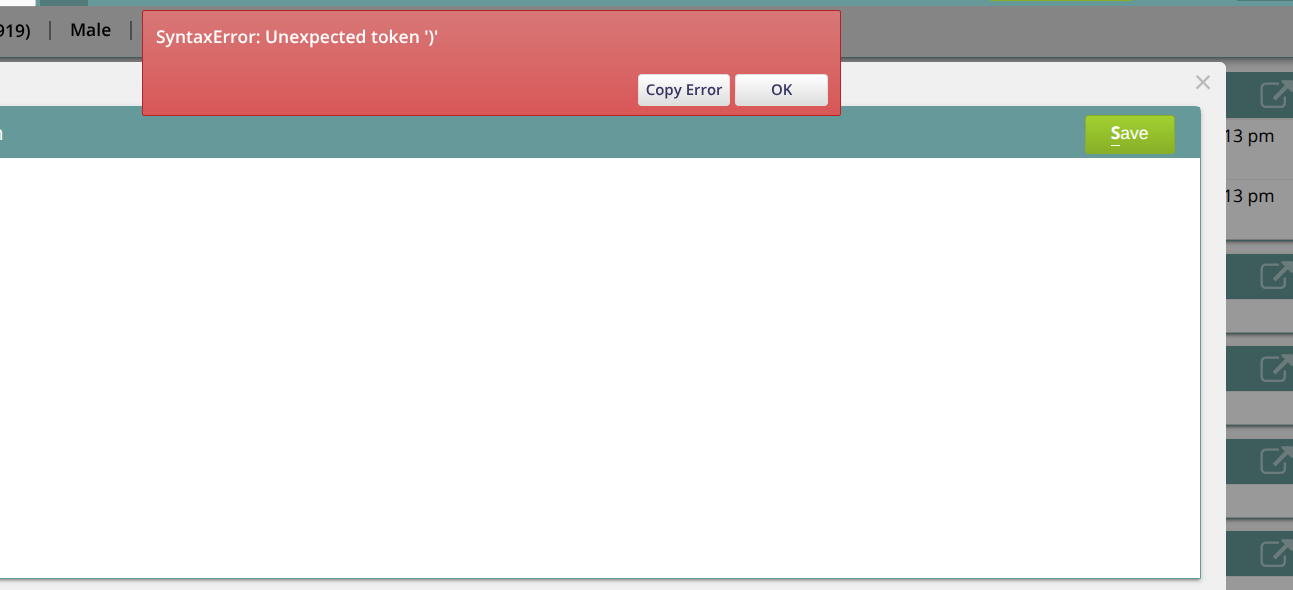
- Some forms open as a blank popup with these errors:
InvalidCharacterError: Failed to execute 'atob'
Error executing form init script:
SyntaxError: Unexpected token ')'
- Some other forms are not loading because their translation files are missing or not found after migration.
Has the form script encoding or translation-file structure/location changed in Bahmni 1.0.0? Is any additional migration required for existing form scripts and translation files?
Issue 2: Form translation API returns 500
For some migrated forms, the translation API fails with a 500 Internal Server Error:
GET /openmrs/ws/rest/v1/bahmniie/form/translations
    ?formName=ENT+Assessment
    &formUuid=c54cdbd0-491f-42b2-b3c7-5cd71b35a781
    &formVersion=3
    &locale=en
Status: 500 Internal Server Error
Because of this error, the translation file is not loaded and the form cannot be displayed correctly.
Could this be caused by missing translation records/files after migration from Bahmni 0.93 to 1.0.0? Is there any additional migration step required for Forms2 translations?
Screenshots are attached. Any guidance would be appreciated.
Thank you.