Hi OpenMRS community! 
We’re excited to share a new O3 microfrontend we’ve been building: an Operation Theater scheduling and management module for OpenMRS 3 (@openmrs/mediviya-esm-operation-theater-module):

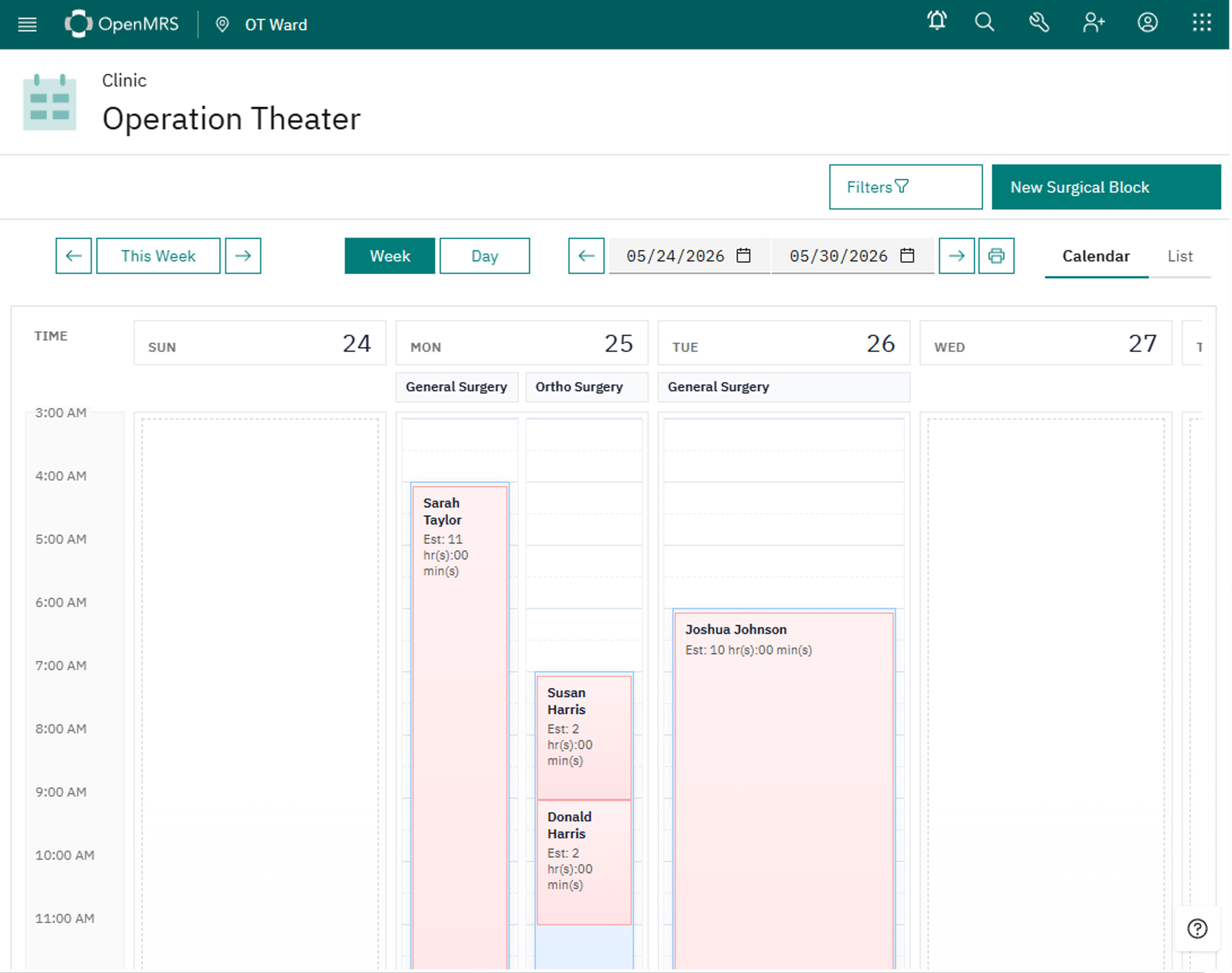
This work was driven by a real clinical need at our implementation sites, where surgical teams needed a modern, tablet-friendly interface to manage their daily OT lists.
As we designed the UI, we drew significant inspiration from the Bahmni OT Module UI — a well-regarded reference implementation for operation theater workflows in the OpenMRS ecosystem. Bahmni’s approach to scheduling views, surgical block management, and the overall OT workflow informed many of our UX decisions. We’ve adapted and extended those patterns to fit the O3 Carbon Design System and added two new capabilities not present in the Bahmni reference: a Freeze Window for locking confirmed surgical blocks, and a tablet-ready responsive view purpose-built for bedside and scrub-area use.
We want to be transparent about this lineage, give credit where it’s due, and invite the Bahmni community and any implementers familiar with that workflow to weigh in — especially on whether our adaptations make sense for a broader O3 audience.
 Problem Statement
Managing and scheduling Operation Theater (OT) activities is a critical workflow in hospital settings. The existing OpenMRS Operation Theater backend module provides solid scheduling logic — but it has no OpenMRS 3 frontend. Clinical staff working in the OT are left using legacy 2.x interfaces that are neither mobile-friendly nor usable on the tablets increasingly found at the scrub sink and nursing station.
The Bahmni OT Module UI demonstrated what a well-designed OT scheduling experience can look like in the OpenMRS ecosystem. We used it as a reference to ensure our O3 implementation follows established clinical workflow conventions — rather than designing from scratch and risking incompatibility with how OT staff actually work.
Additionally, once a surgical block is committed, there was no mechanism to freeze it from further edits — creating a risk of last-minute schedule changes going unnoticed by the surgical team.
 What the Module Does
@openmrs/mediviya-esm-operation-theater-module is a new O3 microfrontend (ESM) that delivers a full Operation Theater scheduling and management UI built on React and the Carbon Design System. It connects entirely to the existing openmrs-module-operationtheater REST API — no backend changes required — and introduces two key additions on top of the existing feature set:
 Freeze Window — allows supervisors to lock a surgical block against further edits after a configurable cut-off time, preventing last-minute schedule disruption
 Tablet-Ready View — a responsive layout optimised for touch input on tablets used at the bedside and in the scrub area
 GitHub Repository
| Resource | Link |
|---|---|
 Repository Repository |
mediviya-esm-ot-module |
 Backend Module Backend Module |
openmrs-module-operationtheater |
 Target Users & Use Cases
| User Role | Use Case |
|---|---|
| Surgical Coordinator | View and manage daily OT schedules; lock blocks before cut-off time |
| Surgeon / Anaesthetist | Check their assigned theater, procedure, and patient details on a tablet in the scrub area |
| Scrub Nurse | View real-time OT list on a wall-mounted or hand-held tablet without needing a desktop login |
| Hospital Administrator | Review historical OT utilisation and throughput per theater |
 Technical Overview
- Type:
@openmrs/esm-*O3 frontend microfrontend (React + Carbon Design System) - Backend: Reuses the existing
openmrs-module-operationtheaterREST API — no new backend module required - Integration points:
openmrs-module-operationtheaterREST endpoints,esm-patient-chart(patient context), O3 SPA shell (navigation & extensions) - UI reference: Bahmni OT Module — workflow patterns and scheduling views adapted to Carbon Design System
- New features (frontend-only):
- Freeze Window — configurable via
esm-config, enforced in UI; no backend schema changes - Tablet View — responsive CSS breakpoints + touch-optimised Carbon components
- Freeze Window — configurable via
- OpenMRS compatibility: O3
3.x, backend module requires OpenMRS Platform2.6+
 Prior Art & Reference
We want to be explicit about our design lineage:
| Reference | What We Borrowed | What We Changed |
|---|---|---|
| Bahmni OT Module UI | Overall scheduling layout, surgical block structure, OT list workflow conventions | Rebuilt in React + Carbon; adapted for O3 SPA shell routing and extension slots |
| openmrs-module-operationtheater | All backend data models and REST API endpoints | No changes — this module is a pure frontend consumer |
We did not copy any Bahmni source code. The Bahmni OT UI served as a clinical and UX reference to ensure our implementation aligns with how OT staff actually work, rather than re-inventing conventions that the Bahmni community has already validated in production.
If any Bahmni contributors spot divergences from clinical best practice in our implementation, we’d genuinely welcome that feedback in this thread.
 Current Status
| Item | Status |
|---|---|
 Core scheduling UI Core scheduling UI |
Complete |
| Freeze Window feature |
Complete |
| Tablet-ready view |
Complete |
 Unit test coverage Unit test coverage |
Improving |
 Community & Implementation Context
- Built by: Specific-Group Healthcare & Specific-Group Kosovo
- Generalizability: The core scheduling view and tablet layout are fully generic. The Freeze Window cut-off time is configurable per site. This module is designed to work alongside any O3 distribution.
 Questions for the Community
- Overlap check — Are there other O3 OT frontends in progress we should be coordinating with?
- Freeze Window design — We implemented this as a purely frontend config guard. Should this be enforced server-side instead? Happy to open a PR on the backend module if there’s appetite.
- Bahmni alignment — For those familiar with the Bahmni OT UI: are there workflow patterns we’ve missed or misrepresented in our adaptation?
- Adoption into core — Would the O3 squad consider
mediviya-esm-operation-theater-moduleas a candidate for the core or community-maintained namespace?- Tablet UX feedback — If you work in a facility that uses tablets clinically, we’d love to hear about your workflow and whether this layout fits.
- Co-maintainers — Is anyone else building OT tooling and open to joining forces?
 How You Can Get Involved
- Try it — install on your O3 instance and share feedback in this thread
Thank you for reading, we look forward to your feedback and to building this together with the community.  — If you like to know about us Specific-Group (SPG) Healthcare you can check out our homepage:
 https://specific-group.com/healthcare-services

 , but OT booking/scheduling feels conceptually very close to “service booking” in general, which is already something handled through appointments. It raises the question (which honestly could already have been asked within Bahmni years ago): should there ultimately be a single backend scheduling/service-booking engine (

