I’m excited to begin working on enhancing the Appointment Calendar within the openmrs-esm-patient-management module as a potential GSoC 2026 project.
I am beginning with the modal enhancement to improve contextual access to appointment information without forcing screen transitions. Once this is stabilized, I will proceed with implementing weekly and daily views.
Over the coming days, I will explore the existing calendar architecture in more depth and begin sharing progress updates, design thoughts, and early implementation previews. I would greatly appreciate feedback and guidance from the community as I refine the approach.
Additionally, I understand that a mentor has not yet been assigned to this project. Could you please advise on the mentor allocation process or let me know whom I should coordinate with while progressing with the initial implementation?
Thank you, and I look forward to collaborating on improving this feature.
I’m currently working on O3-5474: Implement Modal in Appointments Calendar .
Current Behaviour
At the moment, when a user clicks on a date in the Appointments Calendar , the interface directly navigates to the Daily Appointments View .
While this provides detailed information, it also interrupts the calendar workflow since users are immediately taken to another page.
Problem
Users may only want a quick overview of appointments for a specific day without navigating away from the calendar.
Direct navigation can therefore feel unnecessary and break the user’s context within the calendar.
Proposed Solution
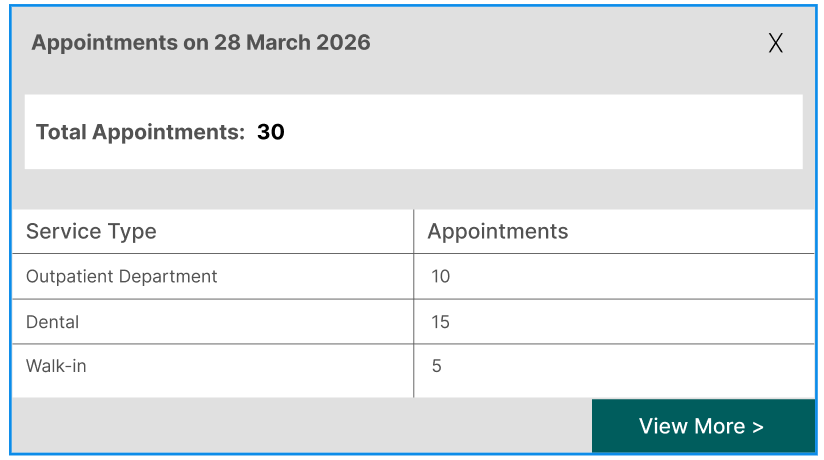
Instead of navigating directly to the detailed page, I propose introducing an intermediate modal that appears when a user clicks on a day in the calendar.
The modal will provide a quick summary of appointments for that day , including:
Total number of appointments
Breakdown of appointments by service type
This allows users to quickly understand the schedule while remaining in the calendar view.
If the user wants more details, they can click “View More” , which will then navigate to the existing Daily Appointments page .
Hello everyone
I’m interested in working on the same, Improved Appointments Calendar View. Since the mentors for this idea are currently listed as TBA, I wanted to ask whom I should connect with regarding this proposal.
I have created a small demo implementation that includes:
a modal for appointment details
drill-down functionality in the calendar view
I would really appreciate it if someone could guide me on:
Who would be the best person to review or discuss this idea with, and
Whether it would be appropriate for me to share the demo and ask a few questions here.
Any guidance would be greatly appreciated. Thank you!
@brijesh1 I think you should create your own talk thread. Since I’m documenting my progress here, it might get mixed up with yours, which could create confusion and make it harder for mentors to review each person’s progress individually.
I’ve drafted an in-depth demo implementation plan for the modal, covering:
Modal design
Modal architecture
Modal registration in OpenMRS
Calendar interaction handling
Data fetching & API integration
Data processing & transformation
I’ve shared the draft proposal with you via Slack DM. I would really appreciate it if you could take a look and provide feedback on how I can improve it before finalizing my GSoC proposal.
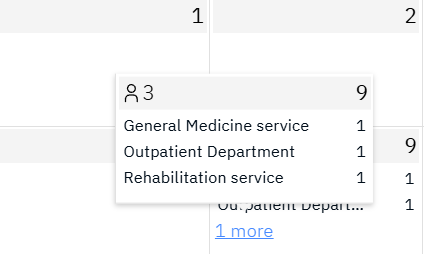
we have this popover component in the day cell, which is visible only for the small-desktop layout.
as we are already implementing the modal for the better ui/ux we should remove this popover??
@bawanthathilan@jayg