How to Deploy OpenMRS 3.x Frontend (ESM Core) with Nginx on Ubuntu - Getting CORS and 404 Errors

Problem

I’m trying to deploy the OpenMRS 3.x frontend (openmrs-esm-core) locally using Nginx on Ubuntu, but I’m encountering multiple errors:

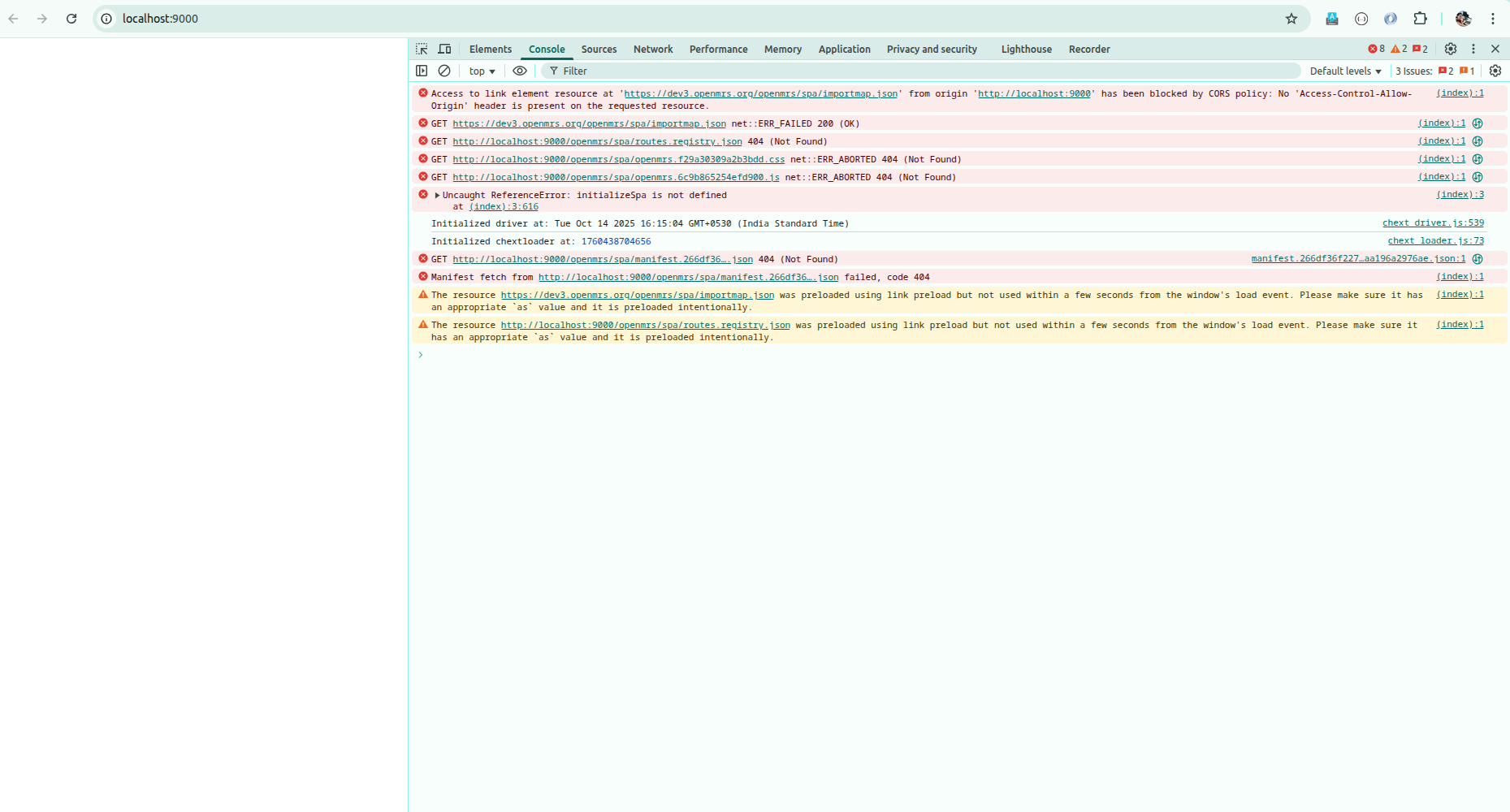
  1. CORS Policy Error: Access to importmap.json from https://dev3.openmrs.org is blocked
  2. 404 Errors: JavaScript files and other assets are not found (404 errors)
  3. ReferenceError: initializeSpa is not defined
  4. net::ERR_ABORTED 404: Resources failing to load

My Current Setup

Repository: GitHub - openmrs/openmrs-esm-core: The core modules of the OpenMRS 3.0 Frontend system

Build Steps:

yarn
yarn setup
yarn build

Nginx Configuration (/etc/nginx/sites-available/openmrs-frontend):

server {
    listen 9000;
    server_name localhost;
    root /home/.../.../openmrs-esm-core/packages/shell/esm-app-shell/dist/*;
    index index.html;
    try_files $uri $uri/ /index.html;
    
    location /openmrs {
        proxy_pass https://dev3.openmrs.org/openmrs;
        proxy_set_header Host $host;
        proxy_set_header X-Real-IP $remote_addr;
    }
    
    location /openmrs/spa/importmap.json {
        proxy_pass https://dev3.openmrs.org/openmrs/spa/importmap.json;
        add_header Access-Control-Allow-Origin *;
    }
}

Browser Console Errors

  • CORS policy blocking external importmap
  • 404 errors for routes_registry, CSS files, and JS files
  • initializeSpa is not defined error
  • All resources returning 404 (Not Found)

Questions

  1. What is the correct Nginx configuration for serving OpenMRS 3.x frontend locally?
  2. How should I handle the importmap.json - should it be proxied or served locally?
  3. Where should the built files be copied to after running yarn build?
  4. How do I properly configure CORS headers for local development?

Environment

  • OS: Ubuntu
  • Nginx: Latest version
  • Node: v24.2.0
  • OpenMRS: 3.x (ESM Core from GitHub)
  • Backend: Proxying to https://dev3.openmrs.org

Any help would be greatly appreciated! Has anyone successfully deployed the OpenMRS frontend with Nginx for local development?


Tags: #nginx #deployment frontend #openmrs-3 #cors #local-development

1 Like

Hi @ritaroypaul!

We normally don’t need Nginx for local development, particularly to serve a frontend app. Can you share details of what you’re working on specifically?

As @samuel34 said, normally you don’t use an nginx deployment for development. Most of our repos provide a start script that will run an individual app using yarn start --sources path/to/app. If you need to make changes to the app shell itself (which is not recommended), the esm-core provides a run:shell script that runs the shell. The default configuration for both of those would load only the code you’re working on locally and proxy to dev3 as a backend.

Thank you for describing the problem and your setup. The official OpenMRS documentation suggests two main deployment paths, including an Nginx/static web server approach for the 3.x frontend. Could you please share the exact Nginx configuration, recommended folder structure, and any CORS/static asset best practices as described in the documentation? For reference, the official guide (https://openmrs.atlassian.net/wiki/spaces/docs/pages/26936930/O3+Setup+Configuration+Deployment#Step-3%3A-Assemble%2C-Build%2C-and-Serve) mentions a ‘Web Server Option’ for serving from Nginx, but the specific steps would be really helpful to ensure my setup matches the documented best practices. A minimal, working example and clarification on serving/importmap handling is much appreciated!

For a production deployment, we use a Docker Compose project setup. In this setup, Nginx is used as the reverse proxy (gateway container) and also serves the frontend asserts (frontend container). That being said, if you want to make changes to the CSP or add CORS support, the Ngnix config of the gateway is the right place.

1 Like

The other alternative way for deployment that i have find interesting is using Azure DevOps, You set up everything in the pipeline using YAML scripts and you are good to go. One challenge with it is when you need to upgrade any ESM module with in that distribution , You got to write more scripts to that in the pipelines, No straight path .