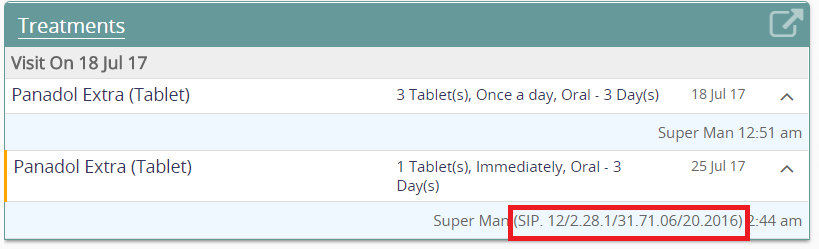
I have requirement where each doctor will be using a unique number assigned from the government and it has to be shown on the patient dashboard. Currently I notice its only showing the doctor full name.
Example of the number is “SIP. 12/2.28.1/31.71.06/20.2016”
I tried to assign that number in the last name but apparently last name field is not meant to accept dots and slashes. Is it possible to achieve the above requirement ? If there’s any workaround I’d like to hear about it. Thanks.
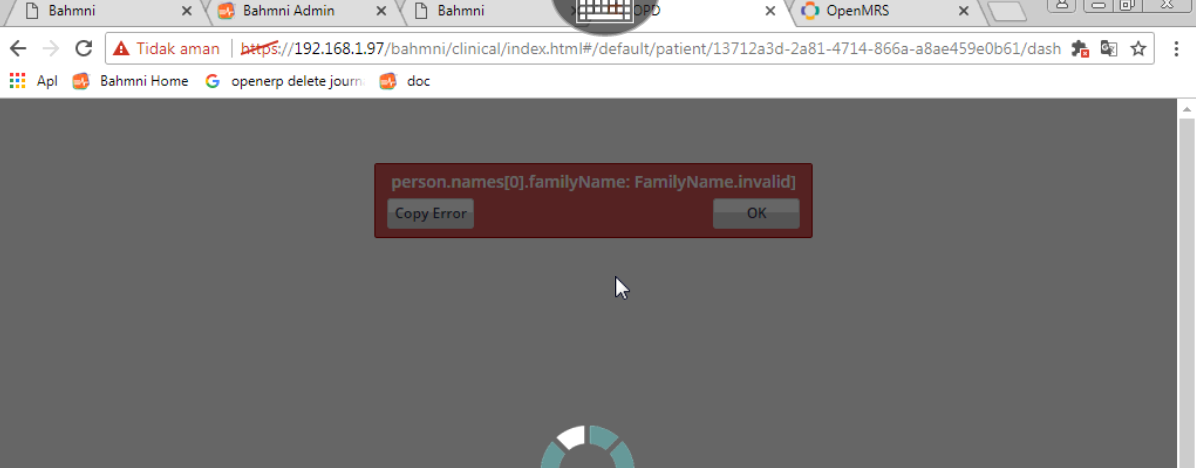
I tried to key in both first and last name in “Given” field while the SIP number in the “Family Name”. However during save in openmrs it throws error. It says FamilyName.invalid
One thing also I notice, even though it says failed it actually save the updated family name. However this cause the Bahmni not accessible when I log in with the provider as shown below
I am not sure if OpenMRS allows numbers to be part of a person’s name. (that it is actually persisting the data is a bug).
@darius, @burke: is there any reason that name can not have numbers? R2D2, Number 1, Io9, 007 etc etc
The error that you see is resultant of that. When we try to get a person associated with such a name, the OpenMRS Web Services throws http 500 error.
e.g. https:///openmrs/ws/rest/v1/user/
Unfortunately, without this hack, there is no other way to display additional info about the provider in the dashboard, without modifying the codebase.
We could possibly send more information about the provider (e.g. identifier), including provider attributes. But I am not sure if that should be case. I think its probably better to provide a link which will open a new window/tab and show the provider information.
@angshuonline I don’t believe this is an openmrs validation issue. I seem to recall Bahmni introducing its own name regex constraint, which is configurable via bahmni_config but which defaults to allowing only letters. I’m not in front of my computer to check but this could be the issue.
I went on demo.openmrs.org and was able to create a patient and a user with numbers for their name (e.g., “1 Smith” and “2 Smith”) and fetch them via REST API without any errors.
So, like @mseaton pointed out, I’m guessing it’s a feature of Bahmni.
In its default installation, Bahmni configures additional constraints for person names (vs what’s in OpenMRS under the hood). See this thread for how to allow numbers (and other characters) in the person name: Bahmni is not display Patient’s local name in clinical module
(Personally I think we should remove this constraint in bahmni’s default config.)
I tried doing it from OpenMRS admin console. This was from the openmrs person management screen (legacy UI).
The global property “patient.nameValidationRegex” is empty and I don’t expect that to kick in for person.
I will check whether there is any interceptor that does the validation for person names. I couldn’t find any. Will have to debug and report back.
Guess it’s because of this openmrs validation, which is determined by the global property GLOBAL_PROPERTY_PATIENT_NAME_REGEX (patient.nameValidationRegex) which i see is defined as ^[a-zA-Z -]+$ in Bahmni openmrs , which won’t allow numbers. Can’t determine when or where that regex was put.
Thats correct Arjun. PersonNameValidator does the validation against the global property that you mentioned (patient.nameValidationRegex). I guess the variable name is slightly confusing, ideally should be “person.nameValidationRegex”.
@abiieez: In such case, go to OpenMRS => Admin => Advance Settings: void the property “patient.nameValidationRegex”.
 True. I just tested that.