Hi everyone  ,
,
I’m working on an Excel import and export feature for OpenMRS. I’m currently finalizing the requirements and wanted to bring the approach to the community especially to get technical feedback, architectural guidance, and possible alignment with existing data-exchange patterns.
Overview
This work targets implementations that frequently collect structured data offline (for example, outreach programs or facility sites with intermittent connectivity). The idea is to allow offline data entry in Excel, then upload and validate those records directly into OpenMRS.
We’re breaking this into two key components:
1. Excel Template Generation
The module should generate an Excel workbook based on selected O3 form definitions / schemas where each form becomes a worksheet (e.g., Patient Registration, Mental Health Assessment, SOAP Note, etc). The generation process should read O3’s JSON schema (stored in clob_datatype_storage) and converts it to an Excel structure.
Answers rendered as radio/select should be turned into Excel dropdowns using Apache POI’s DataValidation API. Each sheet should include data-type formatting (date, numeric, coded), column metadata, and optional hidden validation logic.
Example: O3_Form_Spreadsheet - Google Sheets
2. Excel Import and Validation
After data capture, the user should be able to upload the same workbook into OpenMRS. The backend module should validate the workbook structure , run a dry-run preview, and then persist valid records as encounters and observations. Invalid or incomplete rows are should automatically quarantined into a validation report for review and correction.
Data import must balance flexibility and data quality. Excel data entry requires relaxed validation rules while still identifying and isolating non-processable rows (missing identifiers, invalid formats, or unrecognized patients). Too much in-Excel constraint (e.g., dropdowns) can hurt usability, especially in low-resource contexts. Metadata such as location, user, and import timestamp will be captured at upload for better traceability.
Patient matching should prioritize human-readable identifiers over UUIDs, avoiding over-aggressive deduplication and relying on existing patient merge tools to handle duplicates when necessary. (excerpt from my earlier discussion with @ibacher )
Architecture Overview
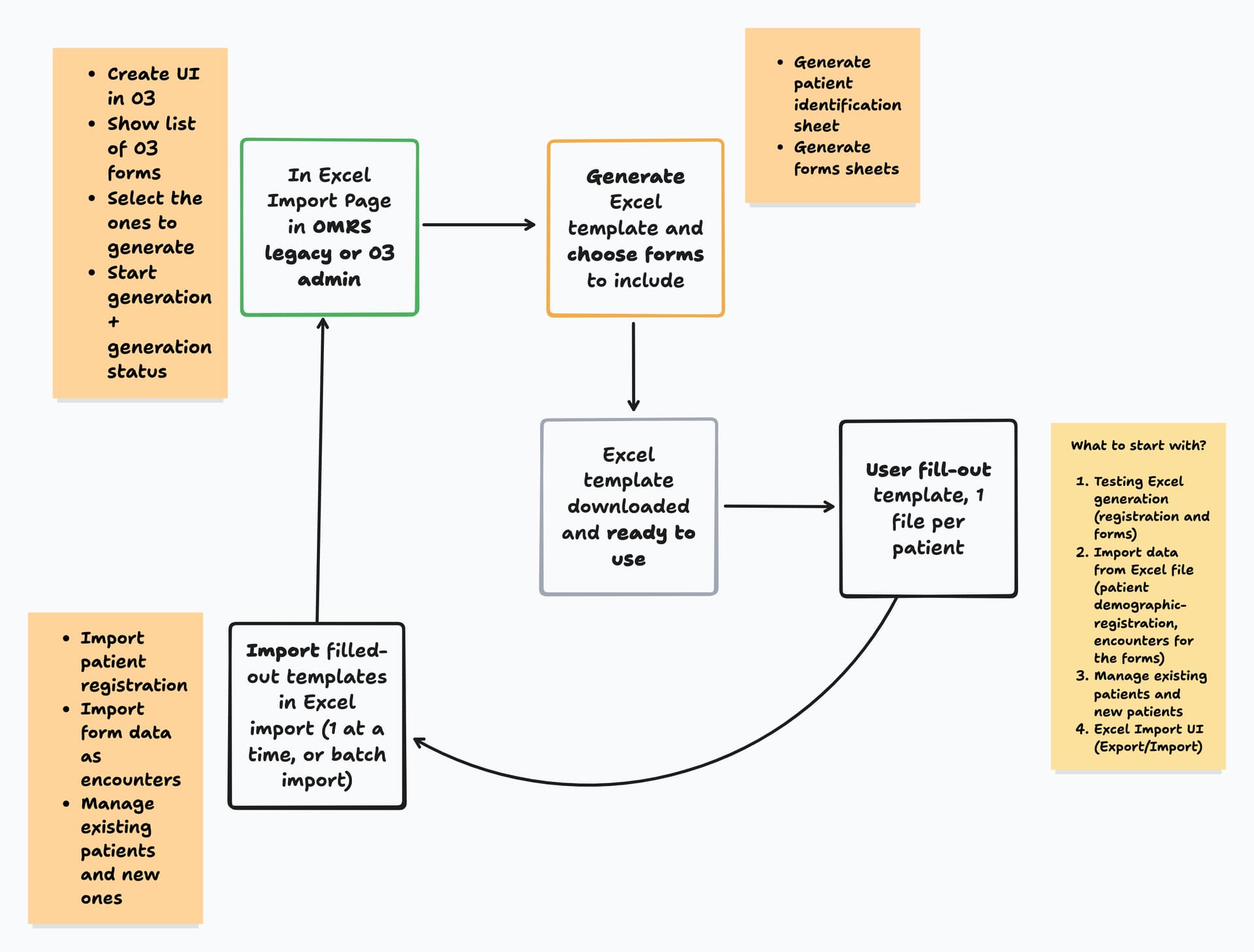
User Flow Overview

Eager to hear thoughts, guidance, and any suggestions on improving the architecture and direction Thank you .
cc: @grace @burke @dkayiwa @ibacher @michaelbontyes @raff @jnsereko @wikumc @ruhanga @samuel34 @ICRC @Madiro @dev5 @dev4 @dev3