@dkayiwa
Availability Update Just a quick heads-up on my schedule: I’m based in Austin, TX (CDT). My best times to contribute will primarily be on weekends, with some occasional availability during the evenings.
Architecture Progress I’ve been iterating on the architecture. Initially, I planned to use a Python worker to poll RabbitMQ, but I’ve decided to pivot to a Java worker. This keeps the logic natively aligned with OpenMRS’s Java-centric API backend. For the AI integration, I’m evaluating Spring AI versus LangChain4j, the final choice will depend on the specific Java runtime version our target OpenMRS environment uses.
Open Questions To help me finalize the design, I could use some clarity on the following:
-
Hardware Targets: Are we assuming CPU-only deployments, or will GPUs be available?
-
Performance Metrics: What are our target metrics and the expected peak number of concurrent users?
-
Deployment Spectrum: What do the absolute best-case and worst-case deployment environments look like?
1. The Worst-Case Target: Low-Resource & Remote
These are often rural clinics or temporary mobile units where stability is a luxury.
-
Hardware: Often a single Mini-Server.
-
Specs: 4–8 GB RAM, Quad-core ARM or low-power Intel CPU. No GPU.
-
Connectivity: intermittent or “Never-on.” The system must operate entirely offline.
-
Design Implication: The Java worker and Ollama instance may share a very small memory pool. This is where RabbitMQ is vital; it prevents the system from crashing if the CPU hits 100% during an LLM inference.
2. The Rugged Target: High-Vibration / Harsh Conditions
Found in mobile clinics, ambulances, or areas with frequent power surges/outages.
-
Hardware: Fanless, solid-state industrial PCs.
-
Power: Unreliable grid. Systems often rely on battery-backed UPS or tablets.
-
Design Implication: Database integrity is the primary risk. The architecture must handle abrupt shutdowns. Using a message broker ensures that a Chat Task isn’t lost if the power cuts mid-summary; it simply remains in the queue for the next boot.
3. The Best-Case Target: Regional Hospital / Cloud
These are large facilities or national-level implementations.
-
Hardware: Enterprise-grade rack servers or Cloud (AWS t3.xlarge+).
-
Specs: 32–128 GB RAM, 16+ Cores. Potential for NVIDIA L4/T4 GPUs in specialized setups.
-
Design Implication: High concurrency. This is where the Ollama parallel configuration and RabbitMQ throughput will be tested by 50+ clinicians using the chart search simultaneously.
Target Constraints Table
| Feature |
Resource-Constrained (Rural) |
Enterprise / Cloud (Hospital) |
| Primary Goal |
Survival & Data Persistence |
High Concurrency & Speed |
| LLM Model |
Tiny/Quantized (e.g., Llama-3-3B-Q4, Gemma) |
Large/Vision (e.g., MedGemma, LLaVA or MedLlama) |
| Inference |
CPU-only (Slow, ~1-2 tokens/sec) |
GPU-accelerated (Fast, 50+ tokens/sec) |
| User Load |
1–5 concurrent clinicians |
50–200+ concurrent clinicians |
Gemma and MedGemma Constraint Mapping
| Target Environment |
Recommended Model |
Hardware Requirements |
Performance Expectation |
| Worst-Case (Rural/Remote) |
Gemma 3 4B or MedGemma 4B (Quantized Q4) |
CPU Only: 8GB+ RAM (e.g., Mini-PC). |
Functional but Slow: ~2–4 tokens per second. Best for simple summarization. |
| Rugged (Mobile/Industrial) |
MedGemma 4B or Gemma 3 12B |
CPU + Fast SSD: 16GB+ RAM. Fanless industrial PCs. |
Consistent: Stable inference. The 4B model is highly responsive on modern CPUs. |
| Best-Case (Hospital/Cloud) |
MedGemma 27B (Multimodal or Text-only) |
GPU Required: NVIDIA L4 (24GB VRAM) or A100. |
Clinical Grade: Fast (~30+ tokens/sec). High accuracy for complex reasoning. |
For Java Logic
Deciding between Spring AI and LangChain4j:
-
Choosing LangChain4j if supporting the Worst-Case targets. It has a smaller footprint and works better with the older Java versions still common in some long-standing remote OpenMRS installations.
-
Choosing Spring AI if certain the target environment is running Java 17+ and a modern OpenMRS Platform (2.6+).
**OpenMRS Local Chart Search and Multimodal AI Architecture
**
This architecture introduces a comprehensive multimodal search system, encompassing both semantic text search and visual image search, alongside the AI chat feature. By integrating multimodal capabilities, clinicians can query patient records using text or medical images, such as X rays or scanned documents.
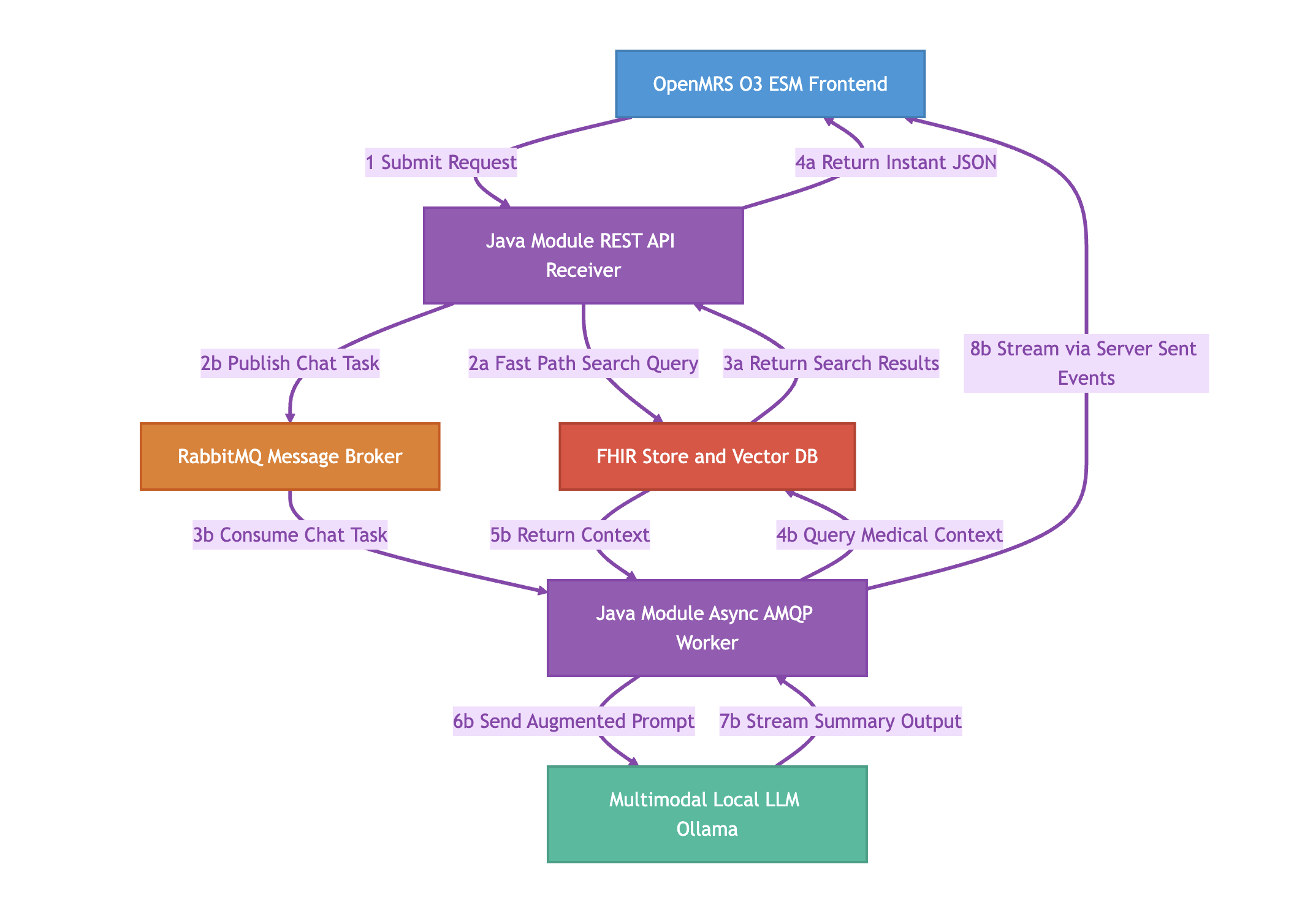
To clarify how the UI maps to the architecture: The OpenMRS O3 ESM Frontend block represents the entire React application. Within that application, there are two distinct interfaces:
-
A Search Box: Used for direct record retrieval (text or image uploads). This triggers Flow A.
-
A Chat UI: Used for conversational AI and summarization. This triggers Flow B.
Here is the direct, step-by-step operational flow of the consolidated Java architecture, explicitly detailing the multimodal and UI routing steps.
Core Components
-
Frontend: OpenMRS O3 ESM (Contains both Search Box UI and Chat UI)
-
Backend: Single Java Module (Hosts the REST API Receiver and Async AMQP Worker)
-
Broker: RabbitMQ (Task queue)
-
Database: FHIR Store, PostgreSQL with pgvector, and Image Storage (Data layer)
-
LLM: Ollama (Multimodal Local AI engine)
Step-by-Step Execution
Initial Routing
Flow A: Synchronous Multimodal Search (Fast Path) This path runs when a user uses the Search Box to find specific records or visually similar X-rays.
-
Step 2a: The REST API bypasses the message broker entirely. It takes the text string or the uploaded image and queries the Database. It performs a semantic search for text similarities OR a visual search comparing image embeddings to find visually comparable medical files.
-
Step 3a: The Database returns the exact matching medical records or similar image files.
-
Step 4a: The REST API instantly returns this data to the Frontend as a standard JSON response, which renders the results under the Search Box.
Flow B: Asynchronous Chat Synthesis (Slow Path) This path runs when a user uses the Chat UI to ask the AI to analyze data and generate a summary.
-
Step 2b: The REST API receives the chat prompt. Because LLM generation is slow, it packages the request into a message, publishes it to RabbitMQ, and returns an immediate HTTP 202 Accepted to the Frontend to keep the UI responsive.
-
Step 3b: The internal Java Async AMQP Worker, running on a separate thread, continuously listens to RabbitMQ and consumes the pending task.
-
Step 4b: The Worker queries the Database for the patient’s relevant textual history and medical images based on the prompt’s context.
-
Step 5b: The Database returns this multimodal context (text + images) to the Worker.
-
Step 6b: The Worker combines the user’s prompt with the retrieved text and images, sending the augmented payload to the Ollama LLM via HTTP.
-
Step 7b: Ollama processes the text and visual data, then streams the generated text summary back to the Worker.
-
Step 8b: The Worker streams the incoming text directly to the Frontend’s Chat UI via Server-Sent Events (SSE) for the user to read in real time.