**Author:**  [@mksrom](https://talk.openmrs.org/u/mksrom)\
**Post date:** [July 31, 2015, 6:13am UTC](https://talk.openmrs.org/t/problems-with-setvalue-jquery-method-in-html-form-entry/2646/1 "2015-07-31T06:13:35Z")
Hi everyone,
I would like to set the value of an obs from my Javascript. That observation is of \ style.
To do so, I use the method provided by HtmlFormEntry module: setValue()
Here is the script at the top of my HTML form:
```
jQuery("#select-order").click(function() {
setValue('drug-dispensed.value', "PENICILLIN V");
});
```
and the obs html code:
```
```
Upon click on the “select-order” item, the value “PENICILLIN V” fills in the auto-complete obs correctly.
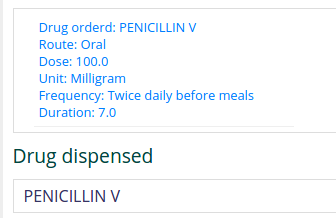
However, **the obs is not saved when hitting the Save button.**
The user needs to click in the field, edit the text (like type or remove a letter) and pick from the auto-complete list to really validate the obs value. 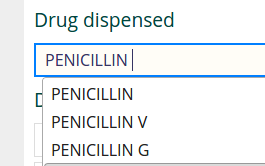
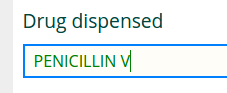
After that, the obs will be saved correctly when clicking on the Save button
Note that this behavior doesn’t seem to match with the documentation:
> Note that if setValue() method is used with an Autocomplete widget, the display value will not be updated, as the setValue method only updates the hidden value of Autocomplete widget. However once the form is saved and submitted, it will save the values correctly.
---
**Author:**  [@mogoodrich](https://talk.openmrs.org/u/mogoodrich)\
**Post date:** [July 31, 2015, 1:42pm UTC](https://talk.openmrs.org/t/problems-with-setvalue-jquery-method-in-html-form-entry/2646/2 "2015-07-31T13:42:18Z")
Seems like a bug/improvement… feel free to enter a ticket in the Html Form Entry project if it doesn’t exist.
Per the behavior not matching the documentation, try setting the value to the actual submitted value–the concept ID, not the text value, ie:
```
jQuery("#select-order").click(function() {
setValue('drug-dispensed.value', 323);
});
```
… and see if this would do what you want. If it does, but you don’t want to reference a concept by ID (since this is generally bad practice since IDs vary from DB to DB) you can do something ugly but workable like this:
```
var conceptId = "" // hopefully I got the nested quotes right
jQuery("#select-order").click(function() {
setValue('drug-dispensed.value', conceptId);
});
```
---
**Author:**  [@mksrom](https://talk.openmrs.org/u/mksrom)\
**Post date:** [August 1, 2015, 12:27pm UTC](https://talk.openmrs.org/t/problems-with-setvalue-jquery-method-in-html-form-entry/2646/3 "2015-08-01T12:27:12Z")
Thanks @mogoodrichI’ve tried to set it to its ID but it doesn’t work either.
I think the problem is not what is actually entered, it is more that the auto-complete field doesn’t seem to realize that it has been filled. Is there a change() method or something like this that I should call to “force” the field to update (similar as a user input) ?
I will enter a ticket.
---
**Author:**  [@michael](https://talk.openmrs.org/u/michael)\
**Post date:** [March 2, 2016, 8:47pm UTC](https://talk.openmrs.org/t/problems-with-setvalue-jquery-method-in-html-form-entry/2646/4 "2016-03-02T20:47:06Z")
A post was split to a new topic: [Sample drug order form for HTML Form Entry?](https://talk.openmrs.org/t/sample-drug-order-form-for-html-form-entry/5048)
---
**Author:**  [@hpardess](https://talk.openmrs.org/u/hpardess)\
**Post date:** [March 25, 2017, 9:56pm UTC](https://talk.openmrs.org/t/problems-with-setvalue-jquery-method-in-html-form-entry/2646/5 "2017-03-25T21:56:53Z")
Could you please share your medicine order HTML Form? Also the screenshot to quickly understand the behaviour and look of form.
---
**Author:**  [@jonathan](https://talk.openmrs.org/u/jonathan)\
**Post date:** [February 11, 2024, 2:20am UTC](https://talk.openmrs.org/t/problems-with-setvalue-jquery-method-in-html-form-entry/2646/6 "2024-02-11T02:20:17Z")
Hey @mksrom How did u go over this …
Am facing the same issue on the autocomplete trying to **autofill a field of expiry date without need to click in it.**
cc @dkayiwa
---
**Author:**  [@mksrom](https://talk.openmrs.org/u/mksrom)\
**Post date:** [February 12, 2024, 6:40am UTC](https://talk.openmrs.org/t/problems-with-setvalue-jquery-method-in-html-form-entry/2646/7 "2024-02-12T06:40:38Z")
Hi @jonathan , this is a quite old topic.
Just to confirm, are you talking about OpenMRS 2.x-based implementation, using HTML Form Entry as the form engine?
---
**Author:**  [@jonathan](https://talk.openmrs.org/u/jonathan)\
**Post date:** [February 12, 2024, 6:48am UTC](https://talk.openmrs.org/t/problems-with-setvalue-jquery-method-in-html-form-entry/2646/8 "2024-02-12T06:48:47Z")
Oh yes @mksrom
---
**Author:**  [@mksrom](https://talk.openmrs.org/u/mksrom)\
**Post date:** [February 12, 2024, 11:05am UTC](https://talk.openmrs.org/t/problems-with-setvalue-jquery-method-in-html-form-entry/2646/9 "2024-02-12T11:05:37Z")
OK. Sorry, it’s been so long since I worked on this that I can’t recall. I _think_ we did not solve the issue though.
Here is the example form that was using the `setValue` functionality with the `autocomplete` attribute. You can take a look. But again, I don’t think we did anything to solve this in the end.
>
---
**Author:**  [@jonathan](https://talk.openmrs.org/u/jonathan)\
**Post date:** [February 12, 2024, 11:07am UTC](https://talk.openmrs.org/t/problems-with-setvalue-jquery-method-in-html-form-entry/2646/10 "2024-02-12T11:07:20Z")
Thanks @mksrom let me see if i can get an override
---
**Author:**  [@jonathan](https://talk.openmrs.org/u/jonathan)\
**Post date:** [February 13, 2024, 6:14am UTC](https://talk.openmrs.org/t/problems-with-setvalue-jquery-method-in-html-form-entry/2646/11 "2024-02-13T06:14:28Z")
Hey @mksrom found a quick solution for this …
one of the issue that was causing it was disabling the field
> expiryInput.prop(‘disabled’, true);
and used the following
> expiryInput.datepicker(‘destroy’);
The above to hide the datepicker selection \ expiryInput.prop(‘readonly’, true);
😀